New Website Design – NJ Concrete Work

Developed by,
South Jersey Techies, LLC.

The Web Design team of South Jersey Techies has been constantly working on developing the best websites including easy mobile approach and the latest website developed by the team is Custom Concrete Designs. Custom Concrete Designs has been a family owned and operated stamped concrete business in South New Jersey and after spending more than 25 years in the business they know that quality work, affordable pricing, and superior customer service is what customers want. Their high standard of service, craftsmanship and top quality concrete products has been propelling the business since 1989.

CustomConcreteDesigns

Want to know how the websites developed by our team appears on your smartphone? Take a look.

CustomConcreteDesignsMobile

Have questions?

Our Web Design team is here to help
Call us at: 856-745-9990 or visit: https://www.sjtechies.com

South Jersey Techies, LLC is a full Managed Web and Technology Services Company providing IT Services, Website Design ServicesServer SupportNetwork ConsultingInternet PhonesCloud Solutions Provider and much more. Contact for More Information.

Windows Tip of the week: Add a second clock to the taskbar

Add a second clock to the taskbar:

Quick: What time is it in Dublin right now? How about Sydney? Mumbai? Cape Town?

Sometimes, that question is just a curiosity. But if you or any of your regular contacts are traveling, it’s good to be able to look up a foreign time zone at a glance.

All modern versions of Windows allow you to add up to two extra clocks to the taskbar. The time you see on the taskbar is the local time zone. But hover the mouse pointer over that time and you’ll see the extra clocks you defined. Click the time to see analog (Windows 7) or digital (Windows 10) clocks for all time zones.

To add an extra clock, right-click the taskbar clock and then click Adjust Date/Time. In Windows 7, click the Additional Clocks tab. In Windows 10, click Add Clocks For Different Time Zones. Select Show This Clock, pick a time zone, and add a descriptive label for each custom clock.

Have questions?

For More Tips & Info from Microsofts Cloud Solutions Partner!
Call us at: 856-745-9990 or visit: https://southjerseytechies.net/

South Jersey Techies, LL C is a full Managed Web and Technology Services Company providing IT Services, Website Design ServicesServer SupportNetwork ConsultingInternet PhonesCloud Solutions Provider and much more. Contact for More Information.

See what’s new with Macbook

A Retina display that takes everything to the edge.

The moment you open your MacBook, its gorgeous 12-inch Retina display with edge-to-edge glass brings everything into focus. Every photo leaps off the screen in rich, vibrant detail. Over 3 million pixels render each letter with crystal clarity. And it all comes to light on the thinnest Retina display ever on a Mac, meticulously honed to deliver a bold visual experience within an impossibly minimal design.

Learn more about Design

Retina Display

A full-size keyboard.
In a fraction of the space.

We believe that a comfortable, full-size keyboard is essential for a great notebook experience. But to fit one into the elegantly thin MacBook, we had to completely rethink how a keyboard is engineered and constructed. We redesigned each key and its underlying mechanism — not only making the whole keyboard much thinner, but also allowing for more comfortable, precise, and responsive typing that just feels right.

Learn more about Design

The trackpad, pushed even further with Force Touch.

MacBook comes with a different way to experience a trackpad. The Force Touch trackpad is engineered to deliver a responsive, uniform click no matter where you press the surface. And underneath, force sensors detect how much pressure you’re applying. You can now use a Force click to enable useful capabilities, like quickly looking up the definition of a word or previewing a file just by clicking and continuing to press the trackpad. You’ll also experience haptic feedback — a tactile vibration from the trackpad that adds the sense of touch to what you see on the screen. These advanced capabilities work in addition to all the intuitive Multi-Touch gestures Mac users love. You’ll be more in touch with your Mac than ever before. Without lifting a finger.

Learn more about Design

Fully equipped for a wireless world.

MacBook is designed to fit effortlessly into our increasingly wireless world. Just about anything you do with a notebook can now be done over the air, thanks to Apple software that takes full advantage of the latest Wi-Fi and Bluetooth wireless technology. So no matter where you are, you can connect to the web, transfer files, organize your photos, listen to music, and more — without being tied down.

Learn more about Design

MacBook2016


USB-C.Singularly versatile.

As long as we were including a port for charging your MacBook, we wanted to make sure it was the most advanced and versatile one available. The USB-C port puts just about everything you need in a port all in one place. This amazing port provides charging, speedy USB 3 data transfer, and video output in a reversible design that’s one-third the size of a USB 3 port, giving you the flexibility to easily connect your favorite devices.

The capability to connect to everything you need.

We gave a lot of consideration to the way MacBook connects to peripherals and power. We chose USB-C for its compact design and versatility. This single port lets you connect your charger; HDMI, DisplayPort, and VGA displays; USB devices like external drives; and your iPhone or iPad. All of which goes to show that sometimes less really is more.

Mackbook2016

A range of accessories lets you connect virtually any device to your MacBook. For instance, the USB-C Digital AV Multiport Adapter lets you connect your MacBook to an HDMI display, as well as a standard USB device and a USB-C charging cable.

Quietly astonishing.

MacBook has been engineered from the ground up for silent, efficient performance. It includes sixth-generation Intel Core M processors that run on just 5 watts of power, made even more efficient by optimizations throughout OS X. Together the processor and OS X sip so little energy that the system generates very little heat, so no fan is required to cool the computer. That means when your MacBook is working, you won’t hear a thing. And the logic board on which the processor sits has been painstakingly engineered to pack all the capability you expect in a Mac into as little space as possible.

Measurably faster.

MacBook features sixth-generation Intel Core m3, m5, and m7 processors with speeds of up to 1.3GHz and up to 25 percent faster graphics. It also comes with faster 1866MHz memory. So your MacBook is quicker and more responsive.

Learn more about Design

MacBook

All-day battery life.
Now even longer.

With the slim MacBook enclosure, all-day battery life simply would not be achievable using traditional rectangular batteries. So we developed our own battery technology specifically designed to make use of every last millimeter of available space. The result is a terraced, contoured battery design that not only fits perfectly inside the incredibly slim MacBook, but also is unlike anything seen before in a notebook. And now, thanks to more efficient processors and improved battery chemistry, battery life has been extended by an hour.

Learn more about Design

OS X

OS X is the operating system that powers everything you do on a Mac. With OS X El Capitan, it’s simple to do amazing things and delightful to do all the everyday things. And it works seamlessly with your apps and iOS devices.

Built-in Apps

Every Mac comes with apps for creativity and apps for productivity. It also comes with a collection of great apps for things you do every day, like surfng the web, sending mail and messages, and organizing your calendar. It even comes with an app for finding new apps. Your Mac is more than fully featured, it’s fully loaded.

Learn more about Built-in Apps

Pure invention.

Learn more about the
design of MacBook

Have questions?

Get answers from Microsofts Cloud Solutions Partner!
Call us at: 856-745-9990 or visit: https://southjerseytechies.net/

South Jersey Techies, LL C is a full Managed Web and Technology Services Company providing IT Services, Website Design ServicesServer SupportNetwork ConsultingInternet PhonesCloud Solutions Provider and much more. Contact for More Information.

To read this article in its entirety click here.

Wawa introduces free WiFi services

PHILADELPHIA – Wawa began offering free WiFi Tuesday for customers at its 700-plus stores.


The service is available through a collaboration between the retailer and Philadelphia-based Comcast, the companies said.

To access the free service, Comcast said, “customers should log on to the ‘xfinitywifi’ SSID in the list of available networks on their devices.”

The service includes public Xfinity WiFi for Wawa customers and private access WiFi for employees and vendors.

Wawa stores operate across the tri-state area, as well as in Maryland, Virginia and Florida. The firm’s WiFi service will be available outside of Comcast’s traditional service areas, the companies said.

Wawa noted it needed “a fast and reliable WiFi solution to enable a consistent in-store experience for its mobile application.” It also said the service allows customers “to take advantage of a free connection without having to rely on their cellular service.”

Bill Stemper, president of Comcast Business, said WiFi has become a vital service for companies looking to improve “the customer experience at their branch locations.”

Have questions?

Get answers from Microsofts Cloud Solutions Partner!
Call us at: 856-745-9990 or visit: https://southjerseytechies.net/

South Jersey Techies, LL C is a full Managed Web and Technology Services Company providing IT Services, Website Design ServicesServer SupportNetwork ConsultingInternet PhonesCloud Solutions Provider and much more. Contact for More Information.

To read this article in its entirety click here.

Exclusive offer from BigBeagle.com

Exclusive offer from: BigBeagle.com  |  24/7 Support: 8885051532
Amit Shah — Customer Number: 57156051

BigBeagle is a reseller of GoDaddy and offers GoDaddy products at a discounted price. Don’t forget to visit our coupon page at http://bigbeagle.com/coupons for the latest and greatest promotions.

Save upto 10% on new purchases of $40 or more and get everything you need. Hurry before the offer expires.

Coupon-5-16

Use promo code rs6558a in your cart when you order.

*Some limitations apply. Applicable to new purchases only. Enter promo code into shopping cart to see full details. Minimum purchase of $40 required. Offer expires Wednesday, May 25, 2016 at midnight (Mountain Time).

Copyright © 2016 BigBeagle.com. All rights reserved.

Windows Tip of the week: Move your specialized data folders to a different drive

Move Documents, Downloads, and other data folders to a different drive:

Every supported version of Windows includes a group of “known folders” for storing specific data types–Documents, Downloads, Music, Pictures, and so on.

By default, these folders are stored on the system drive in your user profile folder, typically C:Users[username]. But you might want to move them to a more appropriate location if you have multiple physical drives. For example, say you have a relatively small SSD as a system drive (C:) on a desktop PC and a much larger conventional hard disk (D:) for data files. In that configuration, it makes sense to move your folders to the D: drive. (This procedure also works if you’ve expanded storage with a MicroSD card.)

Just open your user profile folder by entering %userprofile% in the Run box to display a list of all the folders in that location. Right-click the first folder you want to move, click Properties, and then click the Location tab. Enter the path of the location you want to use. (I created a new folder on the D: drive to hold data files, so my Downloads folder is at D:EdDownloads.)

If the folder name you entered doesn’t exist, Windows will create it. Be sure to click Yes when asked if you want to move all current data files to the new folder.

Have questions?

For More Tips & Info from Microsofts Cloud Solutions Partner!
Call us at: 856-745-9990 or visit: https://southjerseytechies.net/

South Jersey Techies, LL C is a full Managed Web and Technology Services Company providing IT Services, Website Design ServicesServer SupportNetwork ConsultingInternet PhonesCloud Solutions Provider and much more. Contact for More Information.

Hacker collects 272m email addresses and passwords, some from Gmail

Security firm announces it has persuaded fraudster to give up database of email addresses along with passwords users use to log in to websites

hacking gmail

The internet on Wednesday gave you another reminder that everyone has been hacked.

Hold Security, a Wisconsin-based security firm famous for obtaining hoards of stolen data from the hacking underworld, announced that it had persuaded a fraudster to give them a database of 272m unique email addresses along with the passwords consumers use to log in to websites. The escapade was detailed in a Reuters article.

It might sound bad, but it is also easily mitigated.

The passwords and email addresses, which include some from Gmail, Yahoo and Russia’s mail.ru service, aren’t necessarily the keys to millions of email accounts. Rather, they had been taken from various smaller, less secure websites where people use their email addresses along with a password to log in.

People who use a different password for both their email account and, say, Target.com, won’t be affected. But those who tend to use the same password for multiple sites as well as their email should change their email password.

“Some people use one key for everything in their house,” Hold Security founder Alex Holden says. “Some people have a huge set of keys that they use for each door individually.”

Holden said there is no way for consumers to check if their emails were included in his firm’s latest find. In 2014, when his firm tried to set up such a service after obtaining a billion hacked login credentials, his site crashed.

The hacker appears to have been largely targeting Russian users. Some 57m of the email addresses were for the country’s largest email provider mail.ru, which claims 100 million monthly users. Around 40m of the addresses were Yahoo Mail, 33m Hotmail and 24m for Google’s Gmail service.

In this case, the hacker had been bragging on internet chat forums that he had a treasure trove of login credentials that he was trying to sell. Holden, who is fluent in Russian, said he wouldn’t pay for the data but would give him “likes” on various social media posts in exchange.

The hacker, who apparently is quite young, agreed. “We kind of call him the collector,” Holden says in a heavy Russian accent. “Eventually, almost everyone gets breached.”

Have questions?

Get answers from Microsofts Cloud Solutions Partner!
Call us at: 856-745-9990 or visit: https://southjerseytechies.net/

South Jersey Techies, LL C is a full Managed Web and Technology Services Company providing IT Services, Website Design ServicesServer SupportNetwork ConsultingInternet PhonesCloud Solutions Provider and much more. Contact for More Information.

To read this article in its entirety click here.

Exclusive offer from BigBeagle.com

Exclusive offer from: BigBeagle.com  |  24/7 Support: 8885051532
Amit Shah — Customer Number: 57156051

BigBeagle is a reseller of GoDaddy and offers GoDaddy products at a discounted price. Don’t forget to visit our coupon page at http://bigbeagle.com/coupons for the latest and greatest promotions.

Save upto 15% on new purchases of $80 or more and get everything you need. Hurry before the offer expires.

Coupon-5-2016

Use promo code rs6447a in your cart when you order.

*Some limitations apply. Applicable to new purchases only. Enter promo code into shopping cart to see full details. Minimum purchase of $80 required. Offer expires Tuesday, May 10, 2016 at midnight (Mountain Time).

Copyright © 2016 BigBeagle.com. All rights reserved.

Ransomware-as-a-service is exploding: Be ready to pay

RaaS has outgrown smaller targets and now threatens governments, NGOs, and SMBs.

ransomware

It starts with a fast click on a link in a harmless-looking email. Then your PC slows to a crawl. A message suddenly pops up and takes over your screen. “Your files and hard drive have been locked by strong encryption. Pay us a fee in 12 hours, or we will delete everything.” Then a bright red clock begins counting down. No antivirus will save your machine. Pay the fee or lose everything.

You’re the latest victim of a ransomware attack. The scary thing is, you’re not alone. The ransomware market ballooned quickly, from a $400,000 US annual haul in 2012, to nearly $18 million in 2015. The average ransom—the sweet spot of affordability for individuals and SMBs—is about $300 dollars, often paid in cash vouchers or Bitcoin.

The ransomware market scaled up so quickly, claims a recent report by Imperva, due to the rise of ransomware-as-a-service, or RaaS. Here’s how it works:

  • Ransomware authors are marketing on-demand versions of code, using traditional malware distributors in a classic affiliate model.
  • The ransomware author collects the ransom and shares it with the distributor.
  • Malware is distributed through spam email messages, malicious advertisements, and BlackHat SEO sites.
  • According to the Imperva report, “in classical affiliate marketing, the larger cut goes to the possessor of the product. In RaaS … the ransomware author gets a small cut of the funds (5%-25%) while the rest goes to the distributor (affiliate).”
  • Using the deep web, TOR, and Bitcoin, the report says, “this model, based on TOR and Bitcoins, is designed to keep the identity of the author and the distributor hidden from law enforcement agencies.”

Phishing in particular, is a highly effective tactic for malware distribution.

The well-worded email appears to come from a legitimate email address and domain name, and raises very few irregularities. The email comes with a demand for money for an arbitrary service, along with a link that purports to be an “overdue invoice.”

Click that link and open the file (which looks like a Word document), and you’ll become the latest victim of ransomware — that is, malware that encrypts your files and locks you out of your computer until you pay a ransom.

Phishing attacks have also helped ransomware move into the enterprise. In 2015 the medical records system at Hollywood Presbyterian Medical Center was attacked. The hospital paid $17,000 in Bitcoin to unlock the sensitive records. In early 2016 the Lincolnshire County Council was snagged by a phishing scheme and held up for 500 dollars.

To prevent your business from attack, make sure the IT department and communication team are in sync, keep your company’s security systems updated, and remind employees to use caution when clicking on email links from unknown addresses.

If you’ve been hacked, the ransomware rescue kit provides a suite of tools designed to help clean particularly pugnacious malware.

Businesses that suffer ransomware attacks face a tough choice. Paying the fee could restore access to mission-critical data, but there’s no guarantee the extortionists will honor the deal. And of course, paying a ransom provides incentive to hackers and validates the attack.

Have questions?

Get answers from Microsofts Cloud Solutions Partner!
Call us at: 856-745-9990 or visit: https://southjerseytechies.net/

South Jersey Techies, LL C is a full Managed Web and Technology Services Company providing IT Services, Website Design ServicesServer SupportNetwork ConsultingInternet PhonesCloud Solutions Provider and much more. Contact for More Information.

5 free anti-malware tools; VR terms you should know

There’s plenty of free, effective anti-malware protection available. Just don’t let it push your browser around.

Although malware was once predicted to become extinct, it remains a constant threat. Thankfully, countless tools are available to help protect your PC against such security threats—including the popular (and free) anti-malware products on this list.

: AVG AntiVirus Free

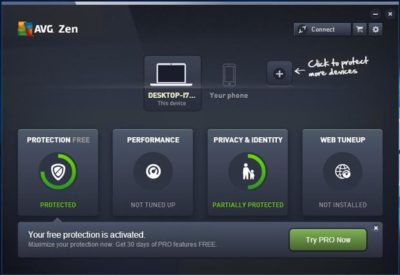
AVG AntiVirus Free (Figure A) provides protection for your computer, your browser, and your mail client. Like many other free products, AVG AntiVirus Free tries to sell you a paid license, which includes an enhanced firewall, anti-spam protection, and a few other features.

Figure A
AVG-SJTechies

Although AVG AntiVirus Free seems to do a good job protecting systems against viruses, you have to be careful about the options you choose when installing and configuring this product. Otherwise, AVG will attempt to “hijack” your browser by installing AVG Web TuneUp, changing your search page, changing your new tab pages, and changing your home page.

2: Malwarebytes Anti-Malware Free

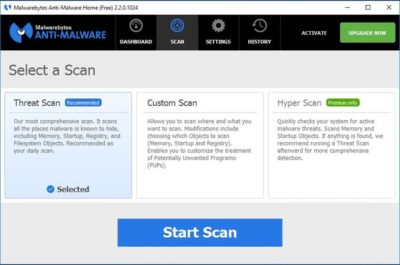
Malwarebytes Anti-Malware Free (Figure B) offers basic protection against malware. There are two main things I like about this app. First, unlike some of the other free anti-malware products, it doesn’t try to change your browser settings or install unwanted toolbars. Second, it has a clean and intuitive interface that doesn’t leave you guessing about what to do.

Figure B
antimalware-SJTechies

The disadvantage to using Malwarebytes Anti-Malware Free is that unlike the premium version, it does not support real-time protection. You can scan your PC for malware at any time, but you won’t be alerted to infections in real time unless you upgrade to the paid version.

3: Avast Free Antivirus 2016

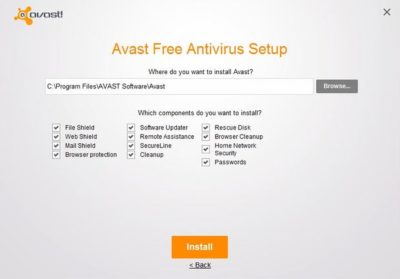
Avast Free Antivirus 2016 (Figure C) is probably the most comprehensive antivirus tool on this list. It offers 12 components, including Rescue Disk, Browser Cleaner, Web Shield, and File Shield. The installer lets you choose which components to install.

Figure C
Avast-SJTechies

During the hour or so that I used Avast Free Antivirus, it did not attempt to take over my browser or engage in any other obnoxious behavior. The software does, however, prominently display a warning message during the installation process telling you in no uncertain terms that Avast Free Antivirus 2016 collects personal information. At least it gives you a way to opt out of this data collection.

4: Panda Free Antivirus

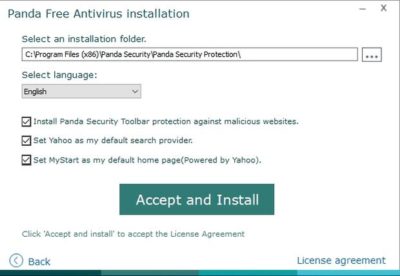
Panda Free Antivirus (Figure D) is another free anti-malware solution that requires a bit of caution during the installation process—otherwise, Panda will install a browser toolbar and change your home page and your default search provider.

Figure D
PandaAntivirus-SJTechies

The free version of Panda Antivirus offers real-time protection against malware, but it does try to get you to upgrade to the paid version. That version, which Panda refers to as the Pro Edition, adds a firewall, Wi-Fi protection, and VIP support.

5: YAC

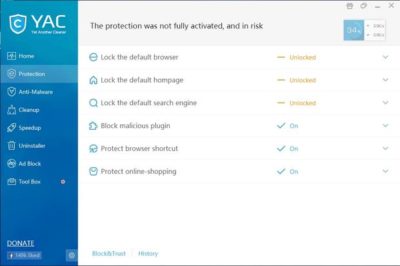
YAC (Figure E) stands for Yet Another Cleaner and—you guessed it—it’s yet another free tool for blocking threats and removing malware from an infected system. It offers a simple, easy-to-follow interface, and it doesn’t try to hijack your browser (which is a personal pet peeve, in case you hadn’t noticed). In fact, the software gives you a way to lock your browser settings so that your preferred home page, default browser, and default search engine can’t be changed without your consent.

Figure E
YAC-SJTechies

In addition to its basic anti-malware capabilities, YAC includes some nice extras, such as a tool for speeding up your computer, an uninstaller, and an ad blocker. The primary disadvantage to using YAC is that you have to upgrade to the paid version if you want to receive real-time protection. Otherwise, you’ll have to initiate anti-malware scans manually.

Have questions?

Get answers from Microsofts Cloud Solutions Partner!
Call us at: 856-745-9990 or visit: https://southjerseytechies.net/

South Jersey Techies, LL C is a full Managed Web and Technology Services Company providing IT Services, Website Design ServicesServer SupportNetwork ConsultingInternet PhonesCloud Solutions Provider and much more. Contact for More Information.

To read this article in its entirety click here.