Category Entertainment Technology

Atari’s Ataribox console will run Linux

Cost $250-$300, if it ever materializes

Now it just needs an E.T. game.

Atari announced in June that it was getting back into the hardware business, with plans for an upcoming “Ataribox” console. Of course, it didn’t release any actual details at the time—only a slick-looking render of a retro-styled box, complete with real wood paneling. Oh, plus a promise to crowdfund the upcoming console.

If alarm bells just started ringing in your head, visions of another Ouya-style disaster, well we can’t say those fears are unfounded. This week Atari further detailed the Ataribox to GamesBeat, and the plan seems even weirder than before.

According to Ataribox creator Feargal Mac, we’re looking at a device that will a) run Linux and b) cost in the neighborhood of $250 to $300. Featuring a custom AMD processor and launching alongside a catalog of classic Atari games, GamesBeat writes, “the idea is to create a box that makes people feel nostalgic about the past, but it’s also capable of running the independent games they want to play today, like Minecraft or Terraria.”

You know what? Best of luck to them. If Valve couldn’t make the Linux-centric living room PC a hot item, though, We’re not sure that Atari will be able to. And that’s all this is—a very cheap Steam Machine, cheaper even than Alienware’s quaint little model.

Is that enough? Probably not. The problem, as always, is the games. Linux gaming is worlds better than it was a few years ago, especially if Atari focuses on the indie scene. Still, we’re talking a pretty small subset of available titles. Atari’s trotted out the ol’ Valve line of “You can install Windows on it if you want,” and that’s not a great omen in my mind.

And even a $250 Ataribox is still plenty expensive considering this thing won’t run any big-budget games. You can buy an Xbox One S for $250 right now on Amazon, and a PlayStation 4 is only $50 more expensive. Sure, it’s a console, but it’ll at least play Wolfenstein II just as easily as it’ll play Terraria.

Atari’s also been quiet about how you’ll control the Ataribox. GamesBeat mentions a “user interface [Atari is] customizing for TVs,” so I assume a controller, but every photo of the Ataribox is just the console on its own. Hell, for all we know Atari will be buying Steam Controllers in bulk and packaging them with the system. Might as well. Those who want to get into the system level and tinker, though, will probably need a keyboard and mouse, which isn’t very living room-friendly.

One last red flag: It’s still being crowdfunded. Plans are for an Indiegogo campaign later this fall, with a release scheduled for Spring 2018. We’ll keep you updated.

Have questions?

Get answers from Microsofts Cloud Solutions Partner!
Call us at: 856-745-9990 or visit: https://southjerseytechies.net/

South Jersey Techies, LL C is a full Managed Web and Technology Services Company providing IT Services, Website Design ServicesServer SupportNetwork ConsultingInternet PhonesCloud Solutions Provider and much more. Contact for More Information.

To read this article in its entirety click here.

Here are the top features of iOS 11

The 10 best features you won’t be able to live without

Ready for some new iPhone and iPad features? iOS 11 is now out of beta and ready for the public. Here are the best features that came with it.

Get ready to back up your iPhone and iPad: iOS 11 is here. Apple released the latest version of its mobile operating system on Tuesday, introducing us to a handful of brand-new features. In fact, this version of iOS feels like the most ambitious version of iOS that Apple has launched in a while. Here are the best new features that we already can’t live without. 

Siri’s new tricks

Siri is one of those features that keeps getting better with each software upgrade, and iOS 11 is no exception. This time, Siri gets a new voice, plus a super-helpful visual interface that lets you even edit your voice request with text input. And now, Siri is able to translate phrases for you—it can process English to Chinese, French, German, Italian, and Spanish. Apple said that it will add more languages in the months to come.

Customizable Control Center

Currently, Control Center in iOS 10 takes up two panels, so you have to navigate to the second panel to access volume controls. However, iOS 11 brings everything back to a single screen and relies more on 3D Touch. Not only that, but you can also customize which controls you’d like to have on there. You can add new controls to quickly access your Wallet, turn on Low Power Mode, and even start Screen Recording—an all-new feature for iOS.

New Live Photo effects

Apple has given us more reasons to want to take Live Photos, those GIF-like moving images. In iOS 11, you can add effects to your Live Photos after you take them. Find a Live Photo on your camera roll and then swipe up. You will be able to add a looping effect to your photo or make it “bounce” back-and-forth, similar to an Instagram Boomerang. You can also make it a long exposure shot for better photos of low-lit scenarios.

Drag-and-drop on iPad

iOS 11 makes for better multitasking on iPad. Now you can drag-and-drop images, links, and files between apps that are open side-by-side, either in Split View or Side Bar mode. In fact, you can drag-and-drop an app from Dock onto Side Bar mode, and drag that secondary app from the right to the left side of the screen.

Markup your screenshots

Everytime you take a screenshot in iOS 11, it will automatically remain floating on the lower left. You can swipe it offscreen to save it to your camera roll as per usual, or you can tap on it to go into Markup. So now, you can add handwritten notes or comments either with your finger or with your Apple Pencil if you’re using an iPad Pro.

Social profiles in Apple Music

Apple Music gets social in iOS 11. Taking a page from Spotify, Apple Music members now have a profile on the streaming app. You can use your profile page to showcase your favorite playlists, as well as the albums you’ve recently listened to. You can also follow friends on Apple Music, and their profile photo will show up next to the albums they’ve listened to. However, there is currently no way to listen to music on private or secret mode, so be ready for your Apple Music followers to get a glimpse at all your guilty pleasures.

Do Not Disturb While Driving

This feature could be a real life-saver. iOS 11 also introduces “Do Not Disturb While Driving” so that the screen goes totally dark when you’re on the road. You can activate this mode manually via Control Center or have it turn on automatically whenever you’re connected to CarPlay or a car’s Bluetooth. In addition, you can go into your Do Not Disturb Settings to setup an automatic response to all your incoming texts to alert people that you’re driving and will get back to them as soon as you arrive.

Document scanner in Notes

There’s no reason to run to the office scanner anymore, thanks to iOS 11. Using the Notes app you can now press the plus (+) sign to access an all-new document scanner. You can scan several documents at once and apply different filters. The scans can be saved inside your Notes, and you can also export them as PDF files that are Markup-friendly, so you can add your signature and send it back.

Search for handwritten Notes

Another cool feature that iOS 11 brings to Notes is the ability to search for things you’ve written our by hand. If you prefer to take notes using your finger or your Apple Pencil on iPad Pro, they are now searchable. 

QuickType keyboard improvements

iOS 11 also makes significant improvements to the software keyboard. On iPhone, you can press-down on the globe icon and choose one-handed mode. This will bring all the keys closer to either the left or right side of the screen to make it easier to type with one hand. You can also make one-handed mode your default keyboard by going into Settings. For iPad, you can now type numbers, symbols, and punctuation marks without switching to a secondary keyboard. Simply flick down on the key to insert the character you need. 

What we’re still waiting for

Apple previewed a lot of new features for iOS 11, but not all of them are yet available. Here’s a quick look at what’s to come later this fall.

1. Apple Pay Cash for sending or receiving cash within Messages

2. Indoor maps for Apple Maps to help you navigate popular shopping centers and major airports worldwide. 

Have questions?

Get answers from Microsoft Cloud Solutions Partner!
Call us at: 856-745-9990 or visit: https://southjerseytechies.net/

South Jersey Techies, LL C is a full Managed Web and Technology Services Company providing IT Services, Website Design ServicesServer SupportNetwork ConsultingInternet PhonesCloud Solutions Provider and much more. Contact for More Information.

To read this article in its entirety click here.

8 ways the iPhone 8 can beat the Galaxy S8

The Galaxy S8 might be the best phone of 2017, but the year’s not over until the next iPhone makes its debut. Here’s how Apple can take the crown back from Samsung.

If there wasn’t already a mountain of pressure on Apple to deliver something spectacular with this year’s iPhone update, there surely is now. If you haven’t noticed, Samsung has released the Galaxy S8 and S8+, and they’re pretty remarkable. As a former iPhone 7 Plus user, the S8+ might very well be the best phone I’ve ever used, with a stunning screen, speedy processor, and, yes, a gorgeous design.

But what makes the S8 so amazing is how unique it is. For the first time in a while, Samsung is standing alone on the cutting edge with a phone that needs to be seen to be believed. From its barely there bezels to its brilliant wraparound screen, the Galaxy S8 truly gives Apple a run for its money. No joke, it actually makes the iPhone 7 look pretty stale.

But there’s still a lot of time between now and the release of the next iPhone. According to rumors, the lineup this year will consist of the usual S models along with a fantabulous iPhone 8, which looks to adopt a similar aesthetic to the Galaxy S8, with an edge-to-edge OLED display and the removal of the physical home button. But just because it might look similar doesn’t mean it can’t still be better. Here’s how Apple can still steal the crown from Samsung:

The Galaxy S8 has a killer camera but the iPhone 7 is no slouch.

Killer camera

The Galaxy S phones has always had a camera on par with the iPhone, so it was a little surprising that Samsung didn’t upgrade the S8’s all that much. The iPhone 7 Plus is already a step ahead here, with 2X optical zoom and the sublime Portrait Mode, but the iPhone 8 could really separate itself from the S8 by taking it even further. Along with a megapixel bump, Apple could add optical image stabilization to the second lens, which will go a long way toward increasing photo and zoom quality. But what would really set it apart would be a larger sensor and greater ISO range to make it a low-light leader.

The Gear VR is a big part of the S8, but AR could be the iPhone 8’s big play.

AR not VR

While Samsung is going all-in on virtual reality with the Galaxy Gear and the S8, rumors suggest that Apple is more interested in augmented reality. And that could be one of the features that sets the iPhone 8 apart. Smartphones have been slow to incorporate AR into the interface, but if Pokémon Go has taught us anything, it’s that people are way more interested in seeing the world through their screens than strapping a headset to their faces. An AR-fueled iPhone 8 could connect us to the world in fun new ways without separating us from reality.

The Galaxy S8’s fingerprint sensor is just in the worst place.

Well-placed fingerprint sensor

While the Galaxy S8 is one of the best smartphones ever made, one tragic flaw prevented it from being perfect: the placement of the fingerprint sensor. For some god-awful reason, Samsung put it right next to the camera, all but ensuring your finger will not only miss it, but also repeatedly smudge the lens. If the rumors are correct that Apple will also be removing the home button in the iPhone 8, it has two options: under the screen or on the back. A first-of-its-kind in-panel sensor would be revolutionary, but if it’s on the back, Apple needs to learn from Samsung’s mistake and put it lower, like on the Pixel.

Bixby hasn’t exactly exploded out of the gate, but it does a lot that Siri doesn’t do.

Expanded Siri

When Samsung unveiled the S8, a major part of the presentation was spent introducing its new AI assistant, Bixby. However, the new service wasn’t just a competitor to Siri, Alexa, and Google Assistant. Samsung integrated Bixby deep into the interface to let it access apps, fetch information, and cut down on how often we need to touch our phones. It’s a cool idea, except the only problem is it doesn’t really work. If Apple could do something similar with Siri and expand its reach to work inside apps while we’re using them, it could beat Bixby at its own game.

The Galaxy S8’s screen is pretty, but It also uses its software to accentuate it.

iOS 11

One of the biggest gripes people have had about Samsung’s phones has always been its TouchWiz interface. But that’s changed with the S8, as Samsung has crafted an intuitive, refined system that takes full advantage of its superb hardware. If Apple is going to release a radically redesigned iPhone with curved edges and a wraparound screen, the same old iOS isn’t going to do it justice. It might be time to rethink iOS for modern times and give it more than new features and a fresh coat of pixels.

Samsung’s wireless charging supports Qi and PMA standards, and the pad stands up or lies flat. But it’s not long range wireless.

True wireless charging

While Samsung has had wireless charging in the Galaxy S since the S6, Apple has been slow to adopt it for the iPhone. All signs indicate that’s going to change for the iPhone 8, but if Apple wants to top the Galaxy S8 and not just keep pace, it’s going to need something a little more exciting than a pretty charging pad. One of the rumors we’ve read suggests that Apple could adopt true long-range wireless charging for the next iPhone, which would power up the battery whenever you’re within range of the charger, even if it’s in your pocket. That alone would be an S8 killer.

The Galaxy S8 includes a pretty great pair of earbuds.

Bundled AirPods

Samsung didn’t just resist the trend to ditch the headphone jack on S8, it embraced the 3.5mm jack in a big way. Inside the S8 box is a pair of premium AKG-tuned earbuds that are a few steps above the usual build and sound quality you get for free—certainly better than what Apple gives us. But if Apple really wants to embrace the wireless future of the iPhone, it needs to stop including a wired set of EarPods, even if they are Lightning. A pair of AirPods in the box (or a cheaper Beats alternative) would really set it apart from the 3.5mm S8 and make a strong statement.

The battery life on the S8 is really good, but the iPhone 8’s could be even better.

Blow-away battery

Samsung has had its share of battery issues, but the S8 looks to put them in the past with a long-lasting battery that hopefully won’t blow up. But while it can get through the whole day for the most part, the S8 didn’t deliver the the real breakthrough we were hoping for. We’re still waiting for a phone that lets us completely forget about the battery until our day is over, and we’d love to see the iPhone 8 deliver something in the range of 12 hours and truly change the game.

Have questions?

Get answers from Microsofts Cloud Solutions Partner!
Call us at: 856-745-9990 or visit: https://southjerseytechies.net/

South Jersey Techies, LL C is a full Managed Web and Technology Services Company providing IT Services, Website Design ServicesServer SupportNetwork ConsultingInternet PhonesCloud Solutions Provider and much more. Contact for More Information.

To read this article in its entirety click here.

Microsoft’s new Surface Laptops unveiled

Microsoft’s most direct shot at the MacBook yet

The one Surface product that fans have been clamoring over for years, a straight up Surface Laptop, is finally here. But, in taking design cues from both the Surface Pro and Surface Book lines, Microsoft has set lofty expectations for its first dedicated laptop device.

Priced at $999 (about £770, AU$1,330), the Surface Laptop clearly aims to chip at the MacBook and MacBook Air models that dominate college campuses practically worldwide. In fact, Microsoft claims that its cheaper (and larger) Surface Laptop can last far longer on a charge than Apple’s 12-inch MacBook: 14.5 hours.

Read More

Thursday night NFL games now stream on Amazon Prime, and that sucks for cord-cutters

Thursday Night Football games are dumping Twitter for Amazon Prime.

Thursday night NFL games streamed with stunning success on Twitter last year, but for the season, football’s jumping ship. The NFL and Amazon announced they’ve reached a $50 million agreement for streaming rights to 10 Thursday Night Football games for the 2017 season—a five-fold increase over the $10 million Twitter paid for last year’s games.

Read More

Microsoft teases Windows 10’s sleek new look for the future

“Project Neon” will give your Windows 10 PC a fresh coat of paint later in 2017.

Microsoft’s planning a sleek visual refresh for Windows 10, and the company quietly teased its first official glimpse of what’s coming in the future during the Windows Developer Day keynote on Wednesday.

There aren’t many details being shared about “Project Neon” right now—as the refresh was called in earlier leaks—but the new visual look will focus on animations and transitions. The basic concept is “to add fluidity, animation, and blur to apps and the operating system,” as first reported by Windows Central. The new design language also hopes to make it easier for developers to create attractive apps.

The design refresh should extend to all Windows 10 devices including PCs and tablets, HoloLens, Xbox, and the few surviving Windows Phones, according to Windows Central.

Twitter user Tom Hounsell shared a clean version of Microsoft’s first look at Windows 10’s forthcoming design tweaks. The image shown on the livestream had large text overlaid on top of the screenshot.

As you can see, this isn’t a huge change, but the visual refresh gives Windows 10 a sleeker, more modern feel. The taskbar icons look a little more dynamic and bolder. Cortana is using the icon instead of the search box, though it’s not clear if this will be the default look. The clock on the taskbar is also bolder, and the usual notification area icons including the Action Center are notably absent. The open Groove Music window itself looks more polished and Aero-esque as well, with no title bar to be seen—just unobtrusive options in the app’s upper-right corner.

The impact on you at home: Windows Central says that some of the code for Project Neon is already available in recent Insider Preview builds of Windows 10; however, it’s unlikely the visual refresh will be ready in time for the massive Creators Update this spring. Microsoft is expected to share more information about Neon during the Build conference in May. The Creators Update is expected to roll out in late March or early April, followed by a second major update later in 2017.

Have questions?

Get answers from Microsofts Cloud Solutions Partner!
Call us at: 856-745-9990 or visit: https://southjerseytechies.net/

South Jersey Techies, LL C is a full Managed Web and Technology Services Company providing IT Services, Website Design ServicesServer SupportNetwork ConsultingInternet PhonesCloud Solutions Provider and much more. Contact for More Information.

To read this article in its entirety click here.

Apple’s bold new red iPhone 7 turns upgrading into a philanthropic decision

iPhone SE gets a storage boost, too.

Apple just made upgrading to an iPhone 7 a philanthropic decision by adding a red special edition to the lineup. The new red aluminum finish, which is available to order for both iPhone 7 and 7 Plus in-store and online on March 24, is a fundraising effort for the Global Fund. Apple will contribute a portion of red iPhone sales to the fight against AIDS and HIV.

Read More

Here’s what’s coming next from Sling TV

Sling TV CEO Roger Lynch talks pricing, DVR, and certified hardware.
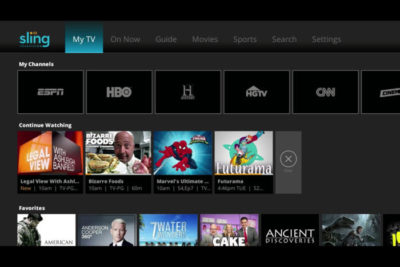
A lot’s changed in the two years since Sling TV made its grand debut at CES 2015. Instead of being the only streaming option for cable channels like ESPN and CNN, Sling is now one of three options alongside PlayStation Vue and DirecTV Now, and it will soon have a fourth competitor in Hulu.

Accordingly, Sling has changed with the times. The company, a subsidiary of Dish Network, has added new channels, created a second base package with a different mix of channels, and is working on a cloud DVR feature.

What else is in store for Sling this year? Here’s what we learned from Roger Lynch, Sling’s CEO, during CES 2017:

On DVR, which is “months” away

Sling began testing DVR service in an invite-only beta on Roku devices last month, and while it’s clearly a work in progress, Lynch says feedback has been positive. “The only feedback that isn’t positive is, ‘I wish I had this feature or that feature,’ all of which are being built already anyway,” Lynch says.

For now, Sling is prioritizing simple improvements like grouping recordings from a series into a folder, rather than listing them all separately. The eventual goal is to list all episodes from a series—whether it’s on-demand, recorded, or live—in a single window.
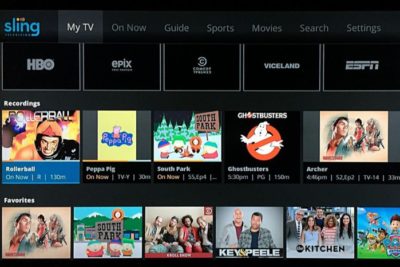
Still, Lynch gave only a rough time frame for when DVR might launch publicly, “It’s not in weeks. It’s not in years. It’s in months,” he says. “We want to get it out as quickly as possible.”

On AirTV and “Optimized for Sling TV”

Just before CES began, Dish announced a new brand called AirTV. Its first product, the AirTV player, puts Sling TV front-and-center, while integrating over-the-air channels and Netflix recommendations into the Sling guide.

Lynch sees AirTV as an example for other device makers to follow. “I’m hopeful that other device partners will make devices similar to this, and do similar types of integrations for Sling, and that it’ll spur innovation in the ecosystem,” he says.
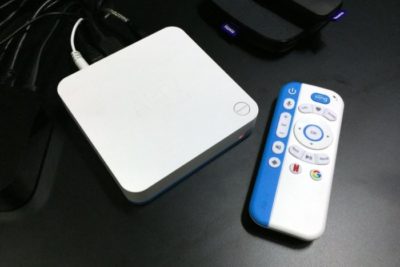
To that end, Sling’s sole CES announcement was an “Optimized for Sling TV” certification program, which will help consumers know whether a device works well with the service. With streaming devices, for instance, criteria could include a Sling button on the remote control, integration with over-the-air broadcasts in the Sling guide, and a way to auto-launch Sling when users turn on the device.

Lynch says Sling is still finalizing how it’ll enforce those criteria. Roku, for instance, pre-loads the Sling app and includes a quick-launch remote button on some models, and that might be enough to earn Sling’s approval. Other types of devices may have different criteria.

“There’s router companies that are looking to be optimized for Sling. So what does that mean for router companies? It doesn’t meant they’re going to integrate OTA and put a button on the remote. It means they’re going to do something to optimize for the experience,” Lynch says.

On separating Sling Orange and Blue

Last year, Sling introduced a second base package, separate from its original $20-per-month plan. The newer plan is called Sling Blue, and it starts at $25 per month, while the original is now called Sling Orange. (Subscribers can bundle the two plans, which have different channel lineups with some overlap, for $40 per month.)

Might Sling eventually try to merge these two plans?

“We work really, really hard not to combine them,” Lynch says. “The problem with combining them is, you end up with a $35 to $40 package because there’s so much content, and you price yourself out of the market from where I think the big opportunities [are].”

That sounds like a shot at rivals like PlayStation Vue, DirecTV Now, and Hulu, none of whom are attempting to match Sling’s base prices. “For us, the Sling Orange product is the perfect cord-cutter product. It’s great for people who use antennas because you’re not forced to buy locals, and locals are really expensive,” Lynch says.

Sling Blue, meanwhile, will likely compete more directly with those larger bundles over time. “That’ll become a broader content package at a higher price point,” Lynch says.

On getting what it wants from TV networks

Since its launch in 2015, Sling has offered a “Replay” feature that lets users rewind live TV and watch several days’ worth of past programming. It’s a nice alternative to setting up a DVR, but not every channel supports the feature.

As you might expect, that’s partly because of issues with streaming rights. But Sling is working on accommodating those issues so it can support Replay on more channels.

“Every program has different requirements, like, can you fast forward, can you not fast forward, yes you can fast forward, but not through commercials,” Lynch says. “There are channels that have granted us rights to Replay, but we haven’t made Replay available on the channel yet, because we still have to put in some technology to enable that, because of the business rules that channel has.”

On the whole, though, negotiating those sorts of features with TV networks is getting easier. Lynch notes that two years ago, Sling was scrambling just to get a basic package together—the service launched with a mere 11 channels—but now TV networks are much more interested.

“When we first launched,” Lynch says, “we didn’t have as much leverage to demand things like that as we do now.”

Have questions?

Get answers from Microsofts Cloud Solutions Partner!
Call us at: 856-745-9990 or visit: https://southjerseytechies.net/

South Jersey Techies, LL C is a full Managed Web and Technology Services Company providing IT Services, Website Design ServicesServer SupportNetwork ConsultingInternet PhonesCloud Solutions Provider and much more. Contact for More Information.

To read this article in its entirety click here.

Microsoft Surface Studio: The smart person’s guide

Everything you need to know about the Surface Studio, Microsoft’s new all-in-one PC designed to tempt professional artists and designers over to Windows.

The Surface Studio is an all-in-one PC with premium specs, designed to wow professional artists, designers, architects and other creatives.

While the $2,999 price tag will deter most consumers, Microsoft seems to be targeting the Studio at design professionals, who would otherwise be using Apple Macs alongside specialist devices like Wacom’s Cintiq drawing tablet.

The Studio is a machine with a lot to recommend it, but one that could still be a leap too far for creatives already heavily invested in alternative tech.

Read More

Everything Microsoft revealed: Surface Studio, Windows 10 Creators Update and more

Microsoft announced a slew of new goodies at its Windows event in New York. Catch up on everything from the Surface Studio all-in-one to the Windows 10 Creators Update here.

One Windows

Microsoft’s big event in New York on Tuesday included plenty of new Surface hardware, but nevertheless, it’s easy to see why the company called this a Windows event rather than a Surface shindig.


Windows and devices chief Terry Myerson kicked things off with a tantalizing glimpse of the features that will debut with the new Windows 10 Creators Update, scheduled to release in the spring. The rest of event was dedicated to new Surface gear designed specifically to marry powerful, thoughtful hardware with the best of those new software features. But don’t take my word for it! Here’s everything Microsoft announced at its October 26 Windows event.


microsoft2
Windows 10 Creators Update

As I said, the freshly revealed Windows 10 Creators Update, scheduled to arrive in early 2017, kicked off the show. The update’s built around three key pillars: the creation and manipulation of 3D content, sharing your Xbox Live gaming experiences, and easily communicating with others—hence the name.


microsoft3
Surface Studio

Microsoft’s first-ever desktop PC is the paragon for all those Windows ideals. The Surface Studio all-in-one mixes stunning physical design and impressive internal hardware, focused on creating the best experience possible for professionals and content creators. From an ultra-slim 4,500×3,000-resolution screen with “True Scale” 1:1 image recreation, to the ability to lay at a 20-degree angle for natural positioning while sketching, to the 6th-gen (Skylake) Core i7 CPU and Nvidia GPU powering it all, the Surface Studio is laser-focused on helping you get things done. (And showing off Windows in the best possible light, naturally.)

These tidbits are just the tip of the iceberg. If you like what you see, the Surface Studio starts at $3,000 and is available for preorder now.


microsoft4
Surface Dial

The Surface Studio’s content-friendly design and Windows 10’s new content creation tools are amplified by the Surface Dial, a radical puck that can control Microsoft’s new PC. It’s primarily designed to work in conjunction with Microsoft’s Surface Pen. Priced at $100, you can preorder it now.

The Surface Dial doesn’t have any buttons of its own. Instead, using it reveals an interface wheel customized for specific applications, with selections occurring as you twist the device back and forth. You may cycle through tool-tip brushes in an image editing app, for instance, or rewind and fast-forward through written notes in Office. A virtual version of the Dial appears even if you don’t place the puck directly onscreen, letting you zoom, scroll, and adjust various options like screen brightness and volume. Mark Hachman’s Surface Dial hands-on explains it all.

Support for the Surface Dial will be baked right into Windows 10, and the accessory will be compatible with the existing Surface Pro 3, Surface Pro 4, and Surface Book.


microsoft5
Surface Book i7

Handily enough, Microsoft also revealed a newer, more powerful version of the Surface Book, the aptly named Surface Book i7. The Surface Book i7 swaps in a sixth-gen Skylake Intel Core i7 processor and an Nvidia GTX 965M GPU to deliver twice the power of the most potent original Surface Book, and (Microsoft claims) three times the power of the beefiest 13-inch MacBook Pro—though Apple’s expected to roll out new Macs tomorrow.

Microsoft also managed to up the Surface Book i7’s battery life to a claimed 15 hours, despite the additional firepower, thanks to a redesigned cooling system and, well, more batteries. The Surface Book i7 starts at $2,400 and is available to preorder now.


microsoft6
Paint 3D

Windows’ venerable Paint app is being dragged into the 21st century. The Windows 10 Creators Update adds Paint 3D, a Windows Store app designed from the ground up to create 3D images even out of 2D pictures.

Paint 3D includes numerous tools for editing three-dimensional images. It also integrates with a new Windows 10 3D-scanning app dubbed Windows Capture 3D, which allows you to digitize real-world objects. Microsoft plans to introduce a “community” hub on Remix3D.com for shared 3D images, plus it’ll let you drag your creations out of Minecraft. Microsoft Office applications will also support 3D images after the Windows 10 Creators Update rolls out.

You have to wonder how many non-professionals are interested in 3D image creation, but there’s no doubting that Paint 3D looks mighty nifty—and like a perfect match for the Surface Studio and Surface Dial’s capabilities.


microsoft7
Windows Holographic VR headsets

You’ll be able to view those 3D creations through Microsoft’s own HoloLens, or via an onslaught of Windows Holographic-compatible VR headsets apparently coming from Dell, HP, Lenovo, Asus, and Acer.

“These headsets will be the first and only to ship with inside-out, six-degree-of-freedom sensors,” said Microsoft’s Terry Myerson. “Unlike every other VR headset on the market today, this means there will be zero need for a separate room. Zero need for a complicated setup.”


microsoft8
My People

Microsoft wants to make your friends the center of your Windows experience with My People, a feature that borrows from Android and iOS. In the Creators Update, five important contacts will appear as profile images in your taskbar. You’ll be able to drop files onto these contacts to immediately share items, or click the contact to interact in a specific app like Mail, Skype, SMS, or Xbox Live. Handy!


microsoft9
Live PC game streaming

Microsoft’s muscling in on Twitch. The Windows 10 Creators Update adds the ability to easily start broadcasting your Xbox Live games via the operating system’s Game DVR toolbar, sending notifications out to your pals and fellow club members to let them know when you’re online. Once they hop into your stream they’ll be able to chat with you, as with every other streaming service out there.

The service is powered by Microsoft’s recent Beam acquisition and looks dead-simple to use. It’s easy to envision Windows 10 Game DVR livestreaming becoming popular on consoles, but Microsoft faces an uphill battle on PCs, where Twitch and tools like Nvidia Shadowplay and OBS already enjoy massive, entrenched user bases.


microsoft10
Custom tournaments and fancy audio

Microsoft’s tying console and PC users closer together with custom tournaments powered by Xbox Live’s Arena platform. Next year, you’ll be able to create your own custom gaming tournaments, controlling everything from the games, to the rules, to the players, to the start times. Previously, Area tournaments were only created by Microsoft and its official partners.

The Xbox One S, which is itself powered by Windows 10, is adding support for bitstreaming Blu-ray audio pass-through and Dolby Atmos. Soon, those 4K videos and games will sound just as glorious as they look.


microsoft11
Surface Mouse and keyboards

The niche Surface Dial isn’t the only Studio peripheral Microsoft announced today, though none of the others made it onto the stage during the big event. Microsoft quietly launched a Surface Mouse and a pair of desktop Surface keyboards—one standard, the other ergonomic—to complement its premium all-in-one PC. All three match the gray aesthetic of Microsoft first-ever desktop PC. The Surface Studio includes a Surface Mouse and basic Surface Keyboard, however.

You can preorder all three on Microsoft’s Surface accessories page, with shipments scheduled for early November.

Have questions?

Get answers from Microsofts Cloud Solutions Partner!
Call us at: 856-745-9990 or visit: https://southjerseytechies.net/

South Jersey Techies, LL C is a full Managed Web and Technology Services Company providing IT Services, Website Design ServicesServer SupportNetwork ConsultingInternet PhonesCloud Solutions Provider and much more. Contact for More Information.

To read this article in its entirety click here.

Read More