Here’s what you need to know about South Jersey’s newest area code

“A New South Jersey area code is being introduced to the (609) area code region and it will affect dialing procedures”, Julia Marnin, Cherry Hill Courier-Post

The new area code (640) is being introduced to the (609) area code region in South Jersey and it will affect how local residents dial calls.

The new dialing procedures will be in effect on August 18th.

New phone lines will begin to be issued the area code (640) on September 17th.

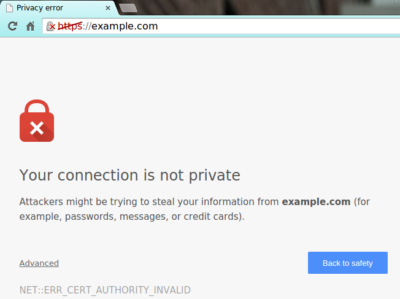
Chrome is marking all HTTP sites as ‘not secure’

Google sends a nudge toward the unencrypted web

Starting in July, Google Chrome marked all HTTP sites as “not secure,” according to a blog post published today by Chrome security product manager Emily Schechter. Chrome currently displays a neutral information icon, but starting with version 68, the browser is warning users with an extra notification in the address bar. Chrome currently marks HTTPS-encrypted sites with a green lock icon and “Secure” sign.

Google has been nudging users away from unencrypted sites for years, but this is the most forceful nudge yet. Google search began down-ranking unencrypted sites in 2015, and the following year, the Chrome team instituted a similar warning for unencrypted password fields.

The Chrome team said the announcement was mostly brought on by increased HTTPS adoption. Eighty-one of the top 100 sites on the web default to HTTPS, and a strong majority of Chrome traffic is already encrypted. “Based on the awesome rate that sites have been migrating to HTTPS and the strong trajectory through this year,” Schechter said, “we think that in July the balance was tipped enough so that we can mark all HTTP sites.”

HTTPS encryption protects the channel between your browser and the website you’re visiting, ensuring no one in the middle can tamper with the traffic or spy on what you’re doing. Without that encryption, someone with access to your router or ISP could intercept information sent to websites or inject malware into otherwise legitimate pages.

HTTPS has also become much easier to implement through automated services like Let’s Encrypt, giving sites even less of an excuse not to adopt it. As part of the same post, Google pointed to its own Lighthouse tool, which includes tools for migrating a website to HTTPS.


Exclusive offer from BigBeagle.com

Exclusive offer from: BigBeagle.com  |  24/7 Support: (888) 505-1532

Don’t forget to visit our coupon page at http://bigbeagle.com/coupons for the latest and greatest promotions.

Save up to 15% and more on all new purchases. Great products just for you. Hurry before the offer expires.

Use promo code in your cart when you order.

*Some limitations apply. Applicable to new purchases only. Enter promo code into shopping cart to see full details. Offer expires Wednesday, August 15, 2018 at midnight (Mountain Time).

Copyright © 2018 BigBeagle.com. All rights reserved.

New Website Design – Jay’s Landscaping, LLC

The Website Design team of South Jersey Techies has been constantly working on developing great looking websites using the latest web technologies. The most recent website developed by our team is for Jay’s Landscaping, LLC in South Jersey

Jay’s Landscaping is a full-service landscape design and installation company. Our services include lawn maintenance, installation of retaining walls, brick walkways and patios, pruning, mulching, drainage, irrigation, and chemical fertilization.

To view the Website 

Have questions?

Our Web Design team is here to help
Call us at: 856-745-9990 or visit: https://southjerseytechies.net

South Jersey Techies, LLC is a full Managed Web and IT Services Company located in Marlton, NJ providing IT ServicesManaged IT Services, Website Design ServicesServer SupportIT ConsultingVoIP PhonesCloud Solutions Provider and much more. Contact Us Today.

Exclusive offer from BigBeagle.com

Exclusive offer from: BigBeagle.com  |  24/7 Support: (888) 505-1532

Don’t forget to visit our coupon page at http://bigbeagle.com/coupons for the latest and greatest promotions.

Save 5% on all new purchases of $20 or more. Great products just for you. Hurry before the offer expires.

Use promo code rs218a6 in your cart when you order.

*Some limitations apply. Applicable to new purchases only. Enter promo code into shopping cart to see full details. Offer expires Friday, July 13, 2018 at midnight (Mountain Time).

Copyright © 2018 BigBeagle.com. All rights reserved.

Website Design – Hassman Research Institute

Hassman Research Institute

The Website Design team of South Jersey Techies has been constantly working on developing great looking websites using the latest web technologies. The most recent website developed by our team is for Hassman Research Institute in Berlin, NJ.


Hassman Research Institute


Have questions?

Our Web Design team is here to help, call us at: 856-745-9990 or visit: https://southjerseytechies.net

South Jersey Techies, LLC is a full Managed Web and IT Services Company located in Marlton, NJ providing IT ServicesManaged IT Services, Website Design ServicesServer SupportIT ConsultingVoIP PhonesCloud Solutions Provider and much more. Contact Us Today.

Website Design – Frank’s Express Car Wash

The Website Design team of South Jersey Techies has been constantly working on developing great looking websites using the latest web technologies. The most recent website developed by our team is for Frank’s Express Car Wash in Bensalem, PA; Maple Shade, NJ and Delran, NJ.

Have questions?

Our Web Design team is here to help, call us at: 856-745-9990 or visit: https://southjerseytechies.net

South Jersey Techies, LLC is a full Managed Web and IT Services Company located in Marlton, NJ providing IT ServicesManaged IT Services, Website Design ServicesServer SupportIT ConsultingVoIP PhonesCloud Solutions Provider and much more. Contact Us Today.

Website Design – Event Medical Staffing Solutions

The Website Design team of South Jersey Techies has been constantly working on developing great looking websites using the latest web technologies. The most recent website developed by our team is for Event Medical Staffing Solutions in Sharon Hill, PA.

Event Medical Staffing Solutions (EMSS) has a nationwide network of emergency medical professionals focusing on special events, sporting events, construction sites, medical escort services and the television and film industry.

Event Medical Staffing Solutions specialize in on-site medical needs for any duration at any location, and any type of event. They have teams on standby 24/7 to respond to your last minute needs.


Have questions?

Our Web Design team is here to help
Call us at: 856-745-9990 or visit: https://southjerseytechies.net

South Jersey Techies, LLC is a full Managed Web and IT Services Company located in Marlton, NJ providing IT ServicesManaged IT Services, Website Design ServicesServer SupportIT ConsultingVoIP PhonesCloud Solutions Provider and much more. Contact Us Today.

New Website Design – W.J. Wallace Paving

The Website Design team of South Jersey Techies has been constantly working on developing great looking websites using the latest web technologies. The most recent website developed by our team is for W.J. Wallace Paving in Delanco, NJ.

W.J. Wallace Paving is a trusted asphalt paving company serving in South Jersey. W.J. Wallace Paving has been consistently providing exceptional value, superior customer service and the highest workmanship in South Jersey for over 30 years.

We specialize in Commercial, Industrial, Municipal and Residential Asphalt paving in South Jersey. Whether it’s paving, patching, resurfacing, seal coating or site clearing, W.J. Wallace Paving is a name you can trust and rely on. W.J. Wallace Paving carries full liability insurance and workers compensation insurance on all employees with one of the best experience modifiers in our industry for safety.

Have questions?

Our Web Design team is here to help
Call us at: 856-745-9990 or visit: https://southjerseytechies.net

South Jersey Techies, LLC is a full Managed Web and IT Services Company located in Marlton, NJ providing IT ServicesManaged IT Services, Website Design ServicesServer SupportIT ConsultingVoIP PhonesCloud Solutions Provider and much more. Contact Us Today.

Windows 10 SSTP VPN Manual Setup Tutorial

Manual Setup

Step 1

Go to your start menu, and type in “network”.  In the search results click on “Network and Sharing Center”

Step 2

Select Connect to a workplace and click Next

Step 3

Click on Use My Internet Conection (VPN)

Step 4

Enter in the internet address (provided by your IT Professional), Name then Create

Step 5

Network and Sharing Center window should still be opened.  Click on Change Adapter Settings

Step 6

Right Click on the new connection you made, then go to Properties

Step 7

Go to the Security Tab, and change your properties to be the same as the below image. Press OK once done.

Step 8

Right Click the Connection and choose “Connect” option.

Step 9

You will be prompted for your username and password for your VPN. (provided by your IT Professional). Enter them as provided. ex. DOMAIN\username and password.

After a few seconds it will connect and show you “Connected” status.

Step 10

You can also check the VPN status in the Network applet (the icon in your system tray at the bottom right).

Connecting the SSTP on Windows 10

Find the network connections icon in the bottom right corner of the screen (near the clock). The icon can be in the shape of computer display or wireless signal meter (you can see it on Step 10). Click on that icon. In the appeared list click on any network connection.
After that you will see another window with the connection list, click on theVPN connection (the connection name can be different, you have set it up on Step 5).
Click the “Connect” button under the connection name.

Disconnecting the SSTP on Windows 10

Find the network connections icon in the bottom right corner of the screen (near the clock). The icon can be in the shape of computer display or wireless signal meter (you can see it on Step 10). Click on that icon. In the appeared list click on any network connection.
After that you will see another window with the connection list, click on theVPN connection (the connection name can be different, you have set it up on Step 5).
Click the “Disconnect” button under the connection name.

Have questions?

Get answers from Microsofts Cloud Solutions Partner!
Call us at: 856-745-9990 or visit: https://southjerseytechies.net/

South Jersey Techies, LL C is a full Managed Web and Technology Services Company providing IT Services, Website Design ServicesServer SupportNetwork ConsultingInternet PhonesCloud Solutions Provider and much more. Contact for More Information.