Trump administration to move all federal IT into the cloud: Is it realistic?

US president Donald Trump recently signed an executive order on cyber-security that mandated federal systems move to the cloud. But, questions remain on the feasibility of that goal.

On Thursday, US President Donald Trump signed his long-awaited executive order on cyber-security, laying out his plans for addressing security in federal IT and across US infrastructure. The most ambitious mandate was that all federal IT systems move to the cloud.

Read More

Massive Delta outage highlights need for quality data center power, backup plans

Business leaders must prepare for disasters made by man or Mother Nature with extensive, practiced recovery plans to avoid system shutdowns.

A Delta ground stop was lifted Monday morning following a 2:30 a.m. ET power outage in Atlanta that delayed and cancelled flights worldwide. Businesses should view this as a cautionary tale, highlighting the importance of quality data center power and disaster control systems.

Delta cancelled approximately 300 flights due to the outage. As of 10:30 a.m. ET, it operated 800 of its nearly 6,000 scheduled flights. However, Delta customers heading to the airport on Monday should still expect delays and cancellations, according to a press release. As inquiries are high and wait times are long, there may also be some lag time in the display of accurate flight status from the airline, it warned.

Read More

Cloud computing: We’ll never be all in, say most companies

In a new report from SolarWinds, 92% of companies say adopting cloud is critical to long-term success. But, most don’t think they’ll ever be fully cloud.

On March 29, IT management software provider SolarWinds released its annual report titled IT Trends Report 2016: The Hybrid IT Evolution, detailing some interesting trends around cloud adoption in the enterprise and the rise of hybrid IT.

First off, according to the results of the report, cloud adoption is a foregone conclusion for most businesses. The report found that 92% of the IT professionals who were surveyed said adopting cloud was important to long-term success in their business. Nearly 30% labeled it extremely important.

However, despite this widespread adoption, most organizations aren’t fully embracing the cloud within the whole of their organization. Joel Dolisy, CIO of SolarWinds, said that is because the cloud isn’t the best option for all workloads.

“The findings of this year’s study paint a clear picture: Cloud adoption is nearly ubiquitous, but it’s not now and will not in the foreseeable future be suitable for all workloads, and even if it were, very few if any companies would convert all of their existing applications to run in the cloud,” Dolisy said in a press release.

The data to support Dolisy’s statement came from the report as well. Only 43% of respondents said that half or more of their IT infrastructure will make it to the cloud over the next 3-5 years. And, 60% said it is unlikely that their entire infrastructure will ever be fully cloud-based. Additionally, 9% said they hadn’t migrated any piece of their infrastructure to the cloud.

Dolisy called the resulting dynamic hybrid IT, where an organization blends critical on-premises tools with cloud-based technologies. This affects IT as well, he said, because it shifts the dynamic of the corporate IT professional to one who can guarantee always-on performance regardless of where he or she is based. Additionally, these professionals need new skills and tools to effectively deploy and manage these environments.

Basically, the rise of this hybrid IT means that IT professionals are faced with two key tasks: Leveraging the cloud to increase efficiency and performance, while maintaining security of critical systems.

So, what are the benefits of this hybrid IT infrastructure? The SolarWinds report listed three in ranked order:

  1. Infrastructure cost-reduction
  2. Increased infrastructure flexibility/agility
  3. Relieving internal IT personnel of day-to-day management of some infrastructure

However, there are some challenges to managing this type of infrastructure as well. Of the respondents, 62% listed security as the top challenge within these type of environments.

Then, of course, there are also inherent challenges to encouraging cloud adoption as well. SolarWinds pegged the top three barriers to overall cloud adoption (which, in turn, affects hybrid IT) as follows:

  1. Security/compliance concerns
  2. Legacy system support
  3. Budget limitations

Nearly 70% have migrated their applications to the cloud, almost 50% have migrated their storage, and 33% have moved their databases.

So, how does this affect your organization? Well, new trends in infrastructure often require new skills to support them.

According to the survey, only 27% are convinced that their IT department has the skills needed to fully support a hybrid IT environment. To succeed in hybrid IT, respondents said they needed better monitoring tools, application migration support, distributed architectures, service-oriented architectures, and automation or vendor management tools.

Hybrid IT also require support from leadership as well. Of those surveyed, 56% felt that they had the support needed to do hybrid IT right.

“In short, IT is everywhere,” Dolisy said. “Effectively managing and monitoring the new environment—from on-premises to the cloud with multiplying endpoints—to be able to act when needed is more critical now than ever.”

The 3 big takeaways for readers

1. Hybrid IT, a mix of cloud and on-premises solutions, is growing as the prevailing trend in IT architecture. Almost all respondents said cloud was critical to future growth, but many felt that their organization would never be fully cloud.

2. Hybrid IT can offer cost reduction, increased agility, and management relief. But, it also brings security challenges, issues with legacy systems, and budget challenges.

3. If your organization is engaging hybrid IT, your IT professionals need the proper tools and skills to stay on top of it. Look into monitoring, different architectures, and automation to help support your staff.

Have questions?

Get answers from Microsofts Cloud Solutions Partner!
Call us at: 856-745-9990 or visit: https://southjerseytechies.net/

South Jersey Techies, LL C is a full Managed Web and Technology Services Company providing IT Services, Website Design ServicesServer SupportNetwork ConsultingInternet PhonesCloud Solutions Provider and much more. Contact for More Information.

To read this article in its entirety click here.

Microsoft Office 365: The smart person’s guide

Office 365 provides the productivity tools required by a modern enterprise workforce. This guide covers key details, including available applications, system requirements, and subscription options.

For just about any enterprise of any size, the productivity of its modern workforce revolves around the basic office suite of email, calendar, word processor, and spreadsheet. But as the enterprise workforce has become more mobile, the basic productivity toolset has had to adapt and change to match new requirements. This is why Microsoft updated Office 365 to be a mobile collaborative platform ready to get work done wherever and whenever it happens.

Microsoft Office 365 is the de facto productivity suite for many enterprises and it is the suite all the other competitors are measured against. So as a leader in information technology for your enterprise, it’s in your best interest to know everything there is to know about Office 365. To help you achieve that goal, TechRepublic compiled the most important details and related resources on Microsoft Office 365 into this “living” guide, which we’ll periodically update as new information becomes available.

Executive summary

What is it? Microsoft Office 365 provides users with the basic productivity applications necessary to get work done in the modern enterprise. It includes applications like Word, Excel, Outlook, PowerPoint, OneNote, and OneDrive, just to name a few.

Why does it matter? As the standard for productivity suites, competing products are generally measured against applications from the Office 365 suite.

Who does it affect? In the modern mobile-centric enterprise, Office 365 provides the tools used to get work done. This makes Office 365 important to just about every working individual.

When is it available? The latest version of Microsoft Office 365 is available right now. The current subscription includes Office 2016 applications.

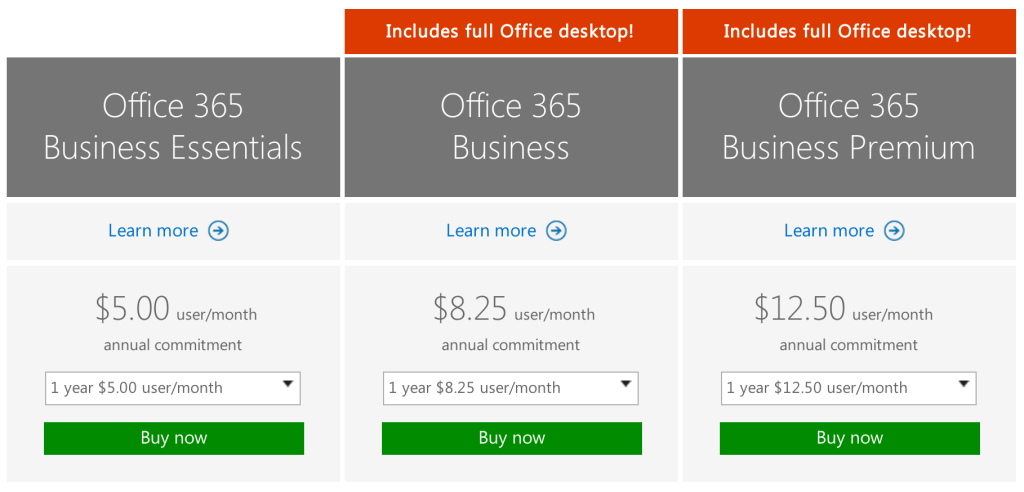
How do you get it? Enterprises can purchase a subscription to Office 365 via the Microsoft website. Subscriptions range from $8/user/month to $35/user/month.

What is it?

Microsoft Office 365 is a subscription service that provides users with the basic productivity applications necessary to get work done in the modern enterprise. Productivity applications include, but are not limited to, a word processor, a spreadsheet, an email client, a calendar, and a presentation application.
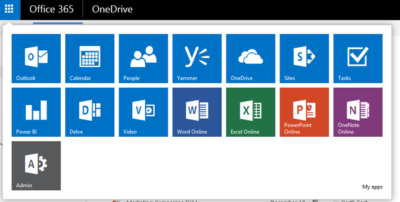
Office365-OneDrive

As an example, a Business Premium subscription to Office 365 ($12.50 per person per month) includes these applications:

Word: This app sets the standard for word processors and is available with Office 365 for both Business and Premium. If users in your enterprise need to create documents, this is the tool they will use.

Excel: The spreadsheet has been the workhorse for basic data analysis since its invention back in the previous century. Excel is the current standard-bearer and comes with Office 365 for Business and Premium.

Outlook: Office 365’s solution for managing email and an appointment calendar is called Outlook. The app has been around for many years and its busy interface tends to be either loved or hated by users. It’s available with both the Business and Premium subscriptions.

PowerPoint: Communicating information to a group of individuals at a meeting often involves a presentation. Office 365’s PowerPoint allows users to create, display, and disseminate information in formats ranging from the basic slide to animation to video.

Publisher: Sometimes communicating information to a broader audience requires something more permanent and more formal than a presentation at a meeting. The Publisher app in Office 365 provides users with the tools they need to publish professional-looking newsletters, brochures, and booklets.

OneNote: As the workforce has become more mobile, the need to capture information on the go has become increasingly important. Applications like OneNote allow users to take notes on any device and then retrieve those notes from any other device. It’s your basic productivity cloud app.

OneDrive: The other basic and fundamental cloud-based application is storage. With each Office 365 Business subscription, Microsoft provides users with up to 1TB of cloud storage in the form of an application called OneDrive for Business.

SharePoint: A subscription to Office 365 Business Premium also provides an enterprise with a few applications for backend infrastructure management. SharePoint, for example, can be used to host intranet websites for the enterprise. It also can be used to host smaller sites designed for smaller teams or divisions. The permissions for these sites can be designated by the users themselves or by appointed administrators.

Exchange: Each Office 365 for Business subscription includes an Exchange Server, which handles all the email management duties. By default, each user is granted 50GB of storage for email. Maintenance of the Exchange Server is generally handled at the administrator level.

Collaboration tools: Along with the typical productivity applications, Office 365 includes many collaboration tools—like Delve, Skype, Yammer, and Sway. These tools allow users to communicate, brainstorm ideas, share documents, and have video meetings while on the go.

Power BI: One of the most powerful tools any enterprise can have, regardless of size, is reliable business intelligence gathering applications. Office 365 for Business, through its Power BI application, provides enterprises with a set of tools for collecting, sorting, and presenting business intelligence data.

Infrastructure: All Office 365 subscriptions include a reliability guarantee of 99.9% uptime. In addition, permissions for internal access control are handled by administrators designated by the enterprise using tools supplied by Active Directory. Each Office 365 subscription includes five layers of security and proactive monitoring to help safeguard your data.

System requirements

  • CPU: 1GHz or faster
  • Memory: 2GB RAM
  • Hard drive: 3GB of available space (6GB for Mac)
  • Display: 1280 X 800 screen resolution
  • Operating system: PC-Windows 7, 8, or 10. Mac-Mac OS X 10.10
  • Connectivity: Internet connection

Why does it matter?

Collaboration and communication are the key components of productivity in the modern enterprise, and productivity is the lifeblood of the enterprise. Microsoft Office 365 provides the tools necessary to bring collaboration and communication—and by extension, productivity—to each individual in an enterprise.

For many companies, Office 365 is the de facto standard for productivity software. The performance of all competing products is generally measured against applications from the Office 365 suite.

Who does it affect?

Just about every knowledge worker in every enterprise is required to have an email account and a calendar application. Beyond that, most individuals in an enterprise will need to use, at least once in a while, a word processor. And a significant number of individuals in an enterprise will also find themselves needing to use presentation software or a spreadsheet at some point in their career.

These are the productivity tools of any enterprise. These are the tools used to get work done. That means Office 365 is important to just about every working individual.

When is it available?

Microsoft Office 365 is available right now. The current subscription includes applications updated to the Office 2016 versions. Of course, the key to the subscription model is that each user will always be using the most current and most secure version of each application because each application is continuously updated.

How do you get it?

Enterprises with fewer than 300 users can purchase a subscription to Office 365 and download the appropriate applications via the Microsoft website. The Premium version costs $12.50 per user per month ($150/year). There are also versions of Office 365 available for individuals ($69.99/year) and households ($99.99/year).
Office-365-SJTechies

For large enterprises, unlimited user versions of Office 365 are available, ranging from $12 per person per month to $35 per person per month. Each subscription caters to a particular type of enterprise. More expensive enterprise versions of Office 365 add features like voicemail, compliance auditing, rights management, encryption, and Advanced Threat Protection.

Have questions?

Get answers from Microsofts Cloud Solutions Partner!
Call us at: 856-745-9990 or visit: https://southjerseytechies.net/

South Jersey Techies, LL C is a full Managed Web and Technology Services Company providing IT Services, Website Design ServicesServer SupportNetwork ConsultingInternet PhonesCloud Solutions Provider and much more. Contact for More Information.

To read this article in its entirety click here.

The 10 most important lessons IT learned in 2015

Every year brings with it new challenges, and new lessons, for IT in the enterprise. Here are 10 of the lessons IT learned this past year.

The end of a year is always a good time for reflection, especially so if you’re evaluating what your business did right and what you can improve upon. In an increasingly digital world, IT has quickly become one of, if not the most, important aspects of an organization. So, it should be with great care that executives and admins look back on their year and try to glean some wisdom about what can be done differently in the year to come.

Here are 10 of the most important lessons that IT learned in 2015.

1. BYOX is here to stay

As smartphone use grew to near ubiquity in the enterprise, it brought with it the trend of BYOD, or, bring your own device. While that originally referred to mobile devices such as smartphones and tablets, it spawned as host of “bring your own” everything else.

“BYOX is the new mantra with consumers bringing their own applications, cloud sharing tools, social media into the enterprise; essentially bringing their own expectations of which technology they want to use and how and where they want to work in a corporate environment,” said Chuck Pol, president of Vodafone Americas.

2. DevOps is no longer just a buzzword

The term “DevOps” gained huge popularity in 2015 as a reference to an agile method that stresses the collaboration of development and operations. The goal is to connect the writers of the code with those who maintain the systems that run it. However, DevOps continues to evolve and, although it has its own set of challenges, it could be poised to become the method of choice for enterprise IT starting in 2016.

3. Data is currency

Data, especially as it relates to big data has been steadily growing in value but 2015 felt like a tipping point. Tools for both structured and unstructured data exploded in popularity and major data service providers went public, adding credibility to the field and likely creating a better inroad into the enterprise. Also, businesses got better at distinguishing between relevant and irrelevant data.

“It is no longer credible to look at data as big static objects in a deep lake, but rather be considered a set of fast moving assets in a raging river,” said Neil Jarvis, CIO of Fujitsu America. “In 2016 and beyond, companies need to look at the data that creates business-relevant information for today and tomorrow.”

4. Finding talent is problematic

Talent shortages don’t just affect startups on the West Coast. CompTIA CIO Randy Gross said that current estimates suggest there are more than one million IT job opening across the US alone, ranging across skill level from support specialists to network admins. Enterprises are going to have to work harder to attract and retain talent.

“Wise employers with IT jobs to fill have engaged in a self-examination of the tactics and strategies they’re using to attract new talent—and adjusting accordingly,” Gross said. “For some companies, new telecommuting and remote work options have helped them fill their talent gaps.”

5. SMAC is still relevant

The SMAC stack, which stands for social, mobile, analytics, and cloud, is also known by some as the “third platform.” As all of these individual components continue to grow and thrive in the workplace, their interdependencies will grow along with them.

“Senior management must become well versed about these technologies and their possibilities to create new value and new competitive advantages in their own business and markets,” Pol said.

6. Cloud lost its fear factor

Cloud acceptance was a mixed bag for a long time, but 2015 brought a more widespread embrace of cloud technologies and services in the enterprise. In fact, some trends are making it almost a necessity.

“The complete adoption of virtualization, as well as investigation into cloud and other strategies, is far more advanced than expected—particularly amongst SMBs,” said Patrick Hubbard, technical product marketing director at SolarWinds. “Making operating systems and applications truly mobile is redefining how companies think about their IT infrastructure.”

7. The security mindset is changing

Anthem BlueCross BlueShield and Harvard University were among the major organizations that dealt with a public security breach in 2015. With today’s social media, you can almost guarantee any data breach that occurs in the enterprise won’t stay a secret. And, with the risk of a breach high, Intel Security CTO Steve Grobman said that teams must adopt a new way of thinking.

“IT must embrace the mindset that they have already been breached, now how do you protect your environment with this new default outlook?,” Grobman said.

8. Shadow IT is a line item

Shadow IT carries nowhere near the same amount of scorn it once did in the enterprise. Some organizations are even openly embracing it, and making it a foundational part of their IT strategy. And, as shadow IT continues to grow, Pol said, it needs to be properly accounted for in the budget.

“As technology continues to transform business, IT infrastructure will become more complex and more difficult to have a complete view of technology across the business,” Pol said. “The role of IT will need to become more strategic and set clear lines of accountability between IT and line of business budget holders.”

9. Employees are the biggest security risk

When most people think about security risks to their organization, the image of the hooded hacker furiously typing away in a dark room. However, employees themselves pose a real threat to the security of an organization as well. Issues such as poor password practices and using unsecured networks with company devices are a real problem. Kelly Ricker, senior vice president of events and education at CompTIA, said mobile, while helping with agility and productivity, is a cybersecurity nightmare.

“Every device that employees use to conduct business—smartphones and smartwatches, tablets and laptops—is a potential security vulnerability,” Ricker said. “Companies that fail to acknowledge and address this fact face the very real risk of becoming a victim of cyber criminals and hackers.”

10. Commoditization is a threat

With the plethora of tools available to build and replicate popular tech, it is increasingly important for organizations to guard against the threat of commoditization.

“As development cycles become shorter and the potential for intellectual property to be recreated and copied increases, it is becoming more difficult to create a sustainable competitive advantage for your products and services,” Pol said.

Have questions?

Get help from IT Experts/Microsofts Cloud Solutions Partner
Call us at: 856-745-9990 or visit: https://techies.net/

South Jersey Techies, LLC is a full Managed Web and Technology Services Company providing IT Services, Website Design ServicesServer SupportNetwork ConsultingInternet PhonesCloud Solutions Provider and much more. Contact for More Information.