Archive

Tools for Office 365

Office-365-New2

PST Capture Tool

Microsoft now offers a free Administrator tool PST Capture Tool.  This tool will discover and import Personal Folders (.pst files) into Exchange 2010 or Exchange Online.  PST Capture will search all computers or specific computers connected to your company network, the .pst files are then sent to PST Capture Central Service, and finally .pst files are sent to Exchange Servers or Exchange Online.

For more information on this tool, click here.

Active Directory Picture
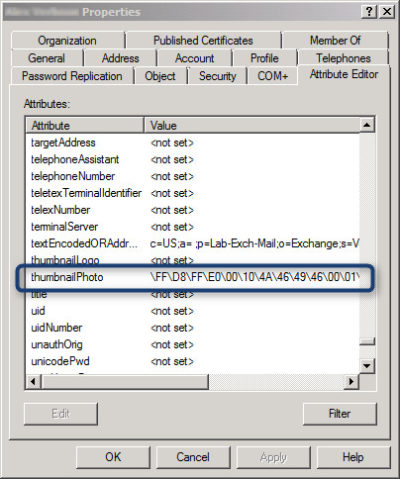
attribute_afterExchange offers an Active Directory attribute (‘thumbnailPhoto’) that allows you to add a picture for each user.  This picture is displayed in Lync Online and on SharePoint.  Currently, Active Directory does not have a way built-in to add images to ‘thumbnailPhoto’ Attribute.

AD Photo Edit is a simple tool that connects to Active Directory and synchronizes with Online Services.  Using AD Photo Edit allows you to upload, edit, update and export images.  There are two options available:

  1. Free Edition
  2. Bulk Edition

Once your photo is uploaded to your “username”  the ‘thumbnailPhoto’ attribute will be properly filled.

To download this tool, click here.

Microsoft Migration Tools

This tool is for Microsoft Online Services only.  Microsoft Online Services Migration Tool forwards copies of Exchange Server mail to Exchange Online mailboxes.  Also, you can copy from other mailboxes such as Exchange Server, POP3 Server and IMAP4 Server to the Exchange Online mailbox.

To download this tool, click here.

Remote Connectivity Analyzer

Microsoft Remote Connectivity Analyzer was once called Microsoft Exchange Remote Connectivity analyzer. This tool allows you to test connectivity for multiple services.
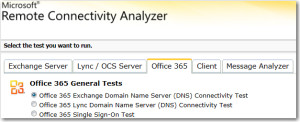
MRCA

To use this tool, click here

Mobile Admin

Office 365 Mobile Admin allows you to perform simple Administrator tasks from an application installed on your smartphone.  The tool allows you to create users, modify users, disable users, delete users and reset passwords.

This application is only available for Windows Phone for $1.49 and will be available soon for Android and iPhone.

For more information on Hosted Services and Office 365

 please contact us 856-745-9990 or click here.


Surface 2 for 2014

surface2Technology is a fast paced industry; current technology and devices are just making way for tomorrow’s new technology. With that said, Microsoft is developing their second generation tablet, Surface 2.

Although in the Top Five Tablets for the first quarter of 2013, Microsoft has not been as successful as planned with the Surface Tablets, only selling half of the units required for their intended goal.

inkTo conquer the growing demand for smaller tablets, Surface 2 will have a 7-9 inch display with a higher screen resolution than its competitors, iPad Mini, Nexus 7 and Kindle Fir..  The iPad Mini offers 1024×768 resolution, the Nexus 7 offers 1280×800 resolution and Kindle Fire offers 1024×600 resolution.  Microsoft expects Surface 2 to offer 1400×1050 resolution.

Partners from the Surface RT and Surface Pro development are working together including Pegatron Technology, Ju Teng, Samsung, LG, Corning, Intel and NVIDIA to build the second generation.

The rumored price of the Surface 2 will be approximately $400.  Microsoft’s Build Developer Conference at the end of June will announce more information regarding the Surface 2 including a possible release date, specifications and features.


Red Cross Statement on Oklahoma Tornado

redcross-logo

The American Red Cross issued the following statement following the tornado in Oklahoma:

WASHINGTON, Monday, May 20, 2013 – Our thoughts and concerns go to everyone in Oklahoma following this horrific tornado.

The American Red Cross has one shelter open in Moore and is working on locating others; we continue to operate three shelters that were opened Sunday in the Oklahoma City area following the storms on Sunday.

Red Cross volunteers are out tonight with food and supplies supporting first responders.

More than 25 emergency response vehicles are positioned to move at first light Tuesday, and we expect that the number will increase. The Red Cross is also sending in kitchen support trailers to support the upcoming operation to provide meals to those forced out of their homes.

People in Oklahoma near the tornado area are encouraged to connect with one another and let loved ones know that they are safe. This can be done through the I’m Safe feature of the free Red Cross tornado app. In addition, if you have access to a computer, go to redcross.org/safeandwell to list yourself as safe. If not, you can text loved ones or call a family member and ask them to register you on the site.

This has been a major disaster, and the Red Cross will be there for the people in this state and this community. People who wish to make a donation to support the Red Cross response can visit redcross.org, dial 1-800-REDCROSS or text REDCROSS to 90999 to make a $10 donation.

Contact: Public Affairs Desk, Telephone: (202) 303-5551, FOR MEDIA ONLY

twitter-bird-light-bgsfacebook_logo

About the American Red Cross:
The American Red Cross shelters, feeds and provides emotional support to victims of disasters; supplies about 40 percent of the nation’s blood; teaches skills that save lives; provides international humanitarian aid; and supports military members and their families. The Red Cross is a not-for-profit organization that depends on volunteers and the generosity of the American public to perform its mission. For more information, please visit redcross.org or join our blog at http://blog.redcross.org.

Surface vs Surface Pro

final

Surface RT

Surface RT was released on October 26, 2012.  Running Windows RT Operating System on a Quad-Core NVIDIA Tegra 3 Processor.  Storage options are 32 GB or 64 GB.  According to recent news, only 16 GB available for the 32 GB hard drive and 46 GB available for 64 GB hard drive.  Bundled with the Surface RT is Office Home & Student 2013 RT Preview.

Office Home & Student 2013 RT includes Word, Excel, PowerPoint and OneNote.  Surface RT does not support Outlook.

The price for the Surface RT is $499.00.

Surface Pro

Surface Pro was release on February 9, 2013.  Running Windows 8 Pro Operating System on Dual-Core Intel i5 Processor.  Storage options are 64 GB or 128 GB.  According to recent news, only 23 GB available for the 64GB hard drive and 83 GB for the 128 GB hard drive.  Bundled with the Surface Pro is Full Office Suite Preview.

Surface Pro is a Business tablet that includes a pen and the pen digitizer.  The stylus helps make taking notes, drawing and marking up documents easy.  The price for the Surface Pen is $29.99.

The price for the Surface Pro is $899.00.

table2

Not included with the purchase of the Surface RT or the Surface Pro is a keyboard.  Microsoft offers two options, Touch cover and Type Cover.  The Touch Cover is a pressure-sensitive keyboard and tablet cover; available in Red, Black, Cyan, White and Magenta.  The price of the Touch Cover is $119.99.  The Type Cover is thin “classic” keyboard and tablet cover; only available in Black.  The price of the Type Cover is $129.99.

typetouchcover2

Type Cover and Touch Cover

Surface Pro

ms_surface_proThe Surface by Microsoft is a crossover between a laptop and a tablet. The Surface Pro is a business tablet that has a detachable keyboard, stylus and a kickstand. Putting the Surface Pro above other tablets is the aptitude to run Microsoft Office programs including Word, Excel and PowerPoint.

Microsoft released a television commercial for the Surface Pro, “The Vibe”, starring Daniel ‘Cloud’ Campos from the original Surface Commercial.  This enthusiastic campaign includes professional dancers as “business people” showing the capabilities of the Surface Pro. Similar to Windows 8, Metro “Modern” UI; the commercial has the same ambiance.

According to IDC, Microsoft has finally made its way to the Top 5 for Tablets. In the first quarter of 2013, Microsoft has 1.8% Market Share. Unlike the first quarter of 2013, Microsoft has 0% Market Share. Also, ASUS moved up from #4 to #3, knocking Amazon down a space.

TopFiveTabletVendors


Tips for Outlook Calendar

Takeaway:  Tips to change defaults for Outlook Calendar.

outlook-logo-vector2

Work Week View:

Default “Work Week” is Monday through Friday, 8AM to 5PM.

  1. Select File tab.
  2. Click Options button.
  3. On the left side of the window, click Calendar button (3rd down).WorkWeekView
  4. Under Work Time Section, enter your Start and End time.
  5. Check the days of your Work Week.
  6. Select the First Day of week.
  7. Select the First week of year.
  8. Click OK.

WorkWeekView2

Reminder Alerts:

ReminderAlertsAfter creating or accepting an appointment, a “Default Reminder” is automatically set to 15 minutes.  

  1. Select File tab.
  2. Click Options button.
  3. On the left side of the window, click Calendar button (3rd down).
  4.  Under Calendar Options Section, select your reminder times.
  5. Click OK.

Calendar Time Slots:

CalendarTimeSlotsTime slots for Calendar Appointments are defaulted to 30 minutes.

  1. Select Calendar View.
  2. Right-Click on Timeline.
  3. Select the interval you prefer.
  4. Outlook will automatically update.
    • 5 minutes:  Most space for details.
    • 60 minutes:  Least space for details


Android Dominates Apple & Microsoft

aam1 Takeaway:  Canalys’ Market Shares for Quarter 1 of 2013 showing that Android is dominating the Worldwide Smart Mobile Market.

After being released in 2007, this Linux-based operating system is the most used platform for smartphones. According to BBC News, Android has 900 million activations.

Android has 59.50% Market Share for the first quarter of 2013, according to Canalys.  Apple has 19.30% Market Share and Microsoft has 18.10%, together does not equal to the Android market.  The  Worldwide Smart Mobile Market includes Netbooks, Smarphones and Tablets

Chart

Microsoft Excel 2013 Flash Fill

excel2Takeaway:  New Tool for Excel 2013 is Flash Fill that identifies formatting and applies it to your spreadsheet.

Flash Fill identifies and adapts to basic formatting to automatically input your data.  It does not identify changes in source data.  This tool performs several tasks such as merging information from multiple columns, adding formatting to current column and fixing anomalies with data.

To use Flash Fill:

  • From the Menu Screen: FF3
    1. Select the Home Tab
    2. In the Editing
    3. Section, select Fill Button
    4. Select Flash Fill
  • Using the keyboard:
    1. [CTRL] + [E]


Formatting

Flash Fill will recognize and apply the selected format to your data.  To use this tool, all information must be added to previous columns.  Flash fill is not perfect.  If data differs from row to row, it will not format correctly (Example:  All phone numbers must have an Area Code or none at all).  After all information is added, move to the next column and enter an example of what you would like done to the data.  Move down to the next row and Flash Fill will initiate when you start typing, press [Enter] to fill column.  Opting out of Flash Fill is just as simple, pressing [Esc] will allow you to continue to enter your data manually. 

EFF1
Above is an example of concatenation; joining two columns of information.

When to use Flash Fill

    1. Formatting
    2. Lists
    3. Concatenation (Joining)
    4. Parsing (Break Down)


Windows XP End of Life

Takeaway:  Many companies are not planning to upgrade when Microsoft ends support for Windows XP.

SCALE2Many users are finding it difficult to adapt to the innovative Windows 8.  The update “Windows Blue” expected to be released before December 2013, has a possibility of restoring the Start button and initially boot to the traditional desktop.

Windows 7 is the most convincing route for upgrading from Windows XP.  Many features are similar to XP including the traditional boot-to-desktop and Start button.  For Windows 7 buyers, extended support until 2020 is offered.

Microsoft officially announced on April 10, 2012 that they will end extended support as of April 8, 2014 for Windows XP and Office 2003.  Although, the risk of vulnerabilities and the cost to limit exposure, XP is still hanging on.  

To protect and upgrade your home or business

 please contact us 856-745-9990


Windows Phone 8

WP8_2

Takeaway:  Information for and against Windows Phone 8.

The second generation Windows Phone was release in October 2012.  Windows Phone 8 bundles essential functionality including navigation, storage, sharing and apps.

Windows Phone 8 runs Modern UI (Metro) which is typography-style layout also known as Swiss Style.  Microsoft added several new colors as additional options for users such as Cobalt, Olive, Amber, Steel and many others.

The apps collection does not include popular apps such as YouTube, Flash, HBOGO and several others.  Lastly, Windows Phone 8 does not have vocal turn-by-turn navigation.

Unlike iOS and Android, the core of social media, such as Facebook and Twitter, are built-in to the operating system.  Windows Phone 8 does not have a notification bar (Android) or disrupting notifications (iOS).  Checking social media updates, e-mail and weather will be a simple task after setting up your home screen by arranging live tiles.