What You Need to Know About the Big Chip Security Problem

According to Intel Corp.,most of the processors running the world’s computers and smartphones have a feature that makes them susceptible to hacker attacks. The chipmaker, working with partners and rivals, says it has already issued updates to protect most processor products introduced in the past five years, but the news sparked concern about this fundamental building block of the internet, PCs and corporate networks.

The revelation of the so-called Meltdown and Spectre vulnerabilities spurred a scramble among technology’s biggest players, from Apple Inc. to Amazon.com Inc., to enact fixes and reassure customers they were on top of the problem.

1. What’s the problem?

Modern processors guess what they’ll have to do next and fetch the data they think they’ll need. That makes everything from supercomputers to smartphones operate very fast. Unfortunately, as Google researchers discovered, it also provides a way for bad actors to read data stored in memory that had been thought to be secure. In a worst-case scenario, that would let someone access your passwords.

2. How bad is it?

The vulnerability won’t stop your computer working and doesn’t provide an avenue for hackers to put malicious software on your machine. Though it could put important data at risk, there’s been no report so far of anyone’s computer being attacked in this manner. More broadly, though, the new fears could undermine longtime assurances that hardware and chip-level security is more tamper-proof than software.

3. How was it discovered?

The weakness was discovered last year by folks Google employs to find such issues before the bad guys do. Usually, solutions are developed in private and announced in a coordinated way. This time the news leaked before the companies involved had a chance to get a fix in place.

4. What’s being done to fix it?

Chipmakers and operating system providers, such as Alphabet Inc.’s Google and Microsoft Corp., are rushing to create software patches that will close the potential window of attack. Intel said that it expects to have issued updates for more than 90 percent of recently introduced processor products. Amazon.com Inc. said “all but a small single-digit percentage” of its servers have already been protected. In a blog post, Google said its security teams immediately “mobilized to defend” its systems and user data. Some customers of Android devices, Google Chromebook laptops and its cloud services still need to take steps to patch security holes, the company said. Patches for Windows devices are out now and the company is securing its cloud services, Microsoft said in a statement.

5. Is this just an Intel problem?

No, though that seems to be what panicky investors initially thought. Intel says it’s an issue for all modern processors. But rival Advanced Micro Devices Inc. stated that its products are at “near-zero risk.” ARM Holdings, which has chip designs that support all smartphones, said that, at worst, the vulnerability could “result in small pieces of data being accessed” and advised users of its technology to keep their software up to date. Google fingered all three companies. Apple said all Mac computers and iOS devices — including iPhones and iPads — were affected, but stressed there were no known exploits impacting users and that steps taken to address the issue haven’t dented performance.

6. What will the fallout be?

Some computers, mostly older ones, could be slowed down by the software patches that will make them more secure. Intel said that in common situations software might be slowed down by as much as 3 percent or not at all. But in other rare situations, performance might be reduced as much as 30 percent. The company doesn’t expect any financial impact and said it thinks customers will keep buying. As the fixes haven’t been widely deployed yet, it’s unclear whether anyone will even notice or whether computer slowdowns will be widespread. Intel has only done lab tests.

If you’ve ever owned a PC with a DVD drive, you may get a $10 settlement

Don’t expect your money anytime soon, however.

DVD drives may be a thing of the past, but the past could pay you $10 via a proposed settlement from a class-action suit.

If you purchased a DVD-ROM, DVD-RW or combination drive between April, 2003 and December 31, 2008, a collection of DVD drive manufacturers have tentatively agreed to pay you $10 per drive, whether you purchased the drive as part of a PC or by itself. You’ll simply need to visit the claim site and testify (under penalty of perjury) that you indeed purchased those drives within the given time period, and live in one of the 23 states (plus the District of Columbia) covered by the suit. The deadline to file is July 1.

Why this matters: Though the optical drive market continues to decrease—“the physical disk format is somewhat obsolete in the era of content streaming,” IDC wrote last year—that wasn’t the case fourteen years ago, when virtually all software was distributed via DVD-ROM. Fortunately, the settlement site isn’t asking for proof of purchase yet, but it reserves the right to do so. Filing a claim can take literally seconds, but don’t hold your breath—you’ll probably receive compensation, but there’s no guarantee.

The Wheels of Justice Turn Slowly

Simply put, a group of 23 plaintiffs sued virtually every DVD drive manufacturer, alleging that they collectively conspired to keep drive prices higher than they normally would be, in violation of antitrust laws. Though the defendants denied they did anything wrong, several—Hitachi-LG, Panasonic, NEC, and Sony—settled and agreed to pay a collective total of $124.5 million into four separate settlement funds.

(Note that only DVD drives for PCs are covered; a DVD player, such as the one gathering dust in your living room, isn’t.)

If you do submit a claim, however, the chances of receiving your settlement soon are slim. That’s because seventeen more defendants, including various subsidiaries of BenQ, Philips, Samsung, TEAC, and Pioneer, have yet to settle, and the suit will continue until all of the claims are resolved.

“Because other defendants remain in this litigation, the plaintiffs are proposing that distribution of the settlement funds not occur at this time,” the settlement site reads. “This is to save the expenses associated with distribution.”

In fact, the settlement hearing to finally approve the Hitachi-LG-Panasonic-NEC-Sony agreement will be held on December 8. After that, payments may begin—which means that you’ll probably receive your $10 or less a year from now. Yes, less: Payments will be “up to” $10 per drive, according to the claims site.

You should probably treat the settlement like one of those “print out your own rebate” slips from the turn of the century. Even under the best of circumstances, chances are you’ll have totally forgotten about your $10 windfall by the time the check arrives.

Have questions?

Get answers from Microsoft Cloud Solutions Partner!
Call us at: 856-745-9990

TECHIES is a full Managed IT Services Company headquartered in Marlton, New Jersey for over 20 years with a new location opening soon in Wilson, North Carolina. TECHIES provides Managed IT Services, Cybersecurity Solutions, Website Design ServicesDedicated Server SolutionsIT ConsultingVoIP Phone SolutionsCloud Solutions, Network Cabling and much more.

Here’s what’s coming next from Sling TV

Sling TV CEO Roger Lynch talks pricing, DVR, and certified hardware.
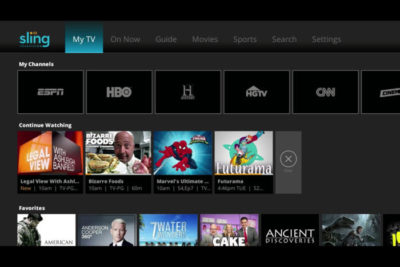
A lot’s changed in the two years since Sling TV made its grand debut at CES 2015. Instead of being the only streaming option for cable channels like ESPN and CNN, Sling is now one of three options alongside PlayStation Vue and DirecTV Now, and it will soon have a fourth competitor in Hulu.

Accordingly, Sling has changed with the times. The company, a subsidiary of Dish Network, has added new channels, created a second base package with a different mix of channels, and is working on a cloud DVR feature.

What else is in store for Sling this year? Here’s what we learned from Roger Lynch, Sling’s CEO, during CES 2017:

On DVR, which is “months” away

Sling began testing DVR service in an invite-only beta on Roku devices last month, and while it’s clearly a work in progress, Lynch says feedback has been positive. “The only feedback that isn’t positive is, ‘I wish I had this feature or that feature,’ all of which are being built already anyway,” Lynch says.

For now, Sling is prioritizing simple improvements like grouping recordings from a series into a folder, rather than listing them all separately. The eventual goal is to list all episodes from a series—whether it’s on-demand, recorded, or live—in a single window.
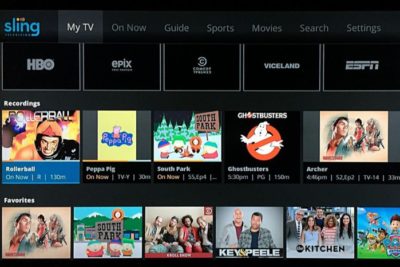
Still, Lynch gave only a rough time frame for when DVR might launch publicly, “It’s not in weeks. It’s not in years. It’s in months,” he says. “We want to get it out as quickly as possible.”

On AirTV and “Optimized for Sling TV”

Just before CES began, Dish announced a new brand called AirTV. Its first product, the AirTV player, puts Sling TV front-and-center, while integrating over-the-air channels and Netflix recommendations into the Sling guide.

Lynch sees AirTV as an example for other device makers to follow. “I’m hopeful that other device partners will make devices similar to this, and do similar types of integrations for Sling, and that it’ll spur innovation in the ecosystem,” he says.

To that end, Sling’s sole CES announcement was an “Optimized for Sling TV” certification program, which will help consumers know whether a device works well with the service. With streaming devices, for instance, criteria could include a Sling button on the remote control, integration with over-the-air broadcasts in the Sling guide, and a way to auto-launch Sling when users turn on the device.

Lynch says Sling is still finalizing how it’ll enforce those criteria. Roku, for instance, pre-loads the Sling app and includes a quick-launch remote button on some models, and that might be enough to earn Sling’s approval. Other types of devices may have different criteria.

“There’s router companies that are looking to be optimized for Sling. So what does that mean for router companies? It doesn’t meant they’re going to integrate OTA and put a button on the remote. It means they’re going to do something to optimize for the experience,” Lynch says.

On separating Sling Orange and Blue

Last year, Sling introduced a second base package, separate from its original $20-per-month plan. The newer plan is called Sling Blue, and it starts at $25 per month, while the original is now called Sling Orange. (Subscribers can bundle the two plans, which have different channel lineups with some overlap, for $40 per month.)

Might Sling eventually try to merge these two plans?

“We work really, really hard not to combine them,” Lynch says. “The problem with combining them is, you end up with a $35 to $40 package because there’s so much content, and you price yourself out of the market from where I think the big opportunities [are].”

That sounds like a shot at rivals like PlayStation Vue, DirecTV Now, and Hulu, none of whom are attempting to match Sling’s base prices. “For us, the Sling Orange product is the perfect cord-cutter product. It’s great for people who use antennas because you’re not forced to buy locals, and locals are really expensive,” Lynch says.

Sling Blue, meanwhile, will likely compete more directly with those larger bundles over time. “That’ll become a broader content package at a higher price point,” Lynch says.

On getting what it wants from TV networks

Since its launch in 2015, Sling has offered a “Replay” feature that lets users rewind live TV and watch several days’ worth of past programming. It’s a nice alternative to setting up a DVR, but not every channel supports the feature.

As you might expect, that’s partly because of issues with streaming rights. But Sling is working on accommodating those issues so it can support Replay on more channels.

“Every program has different requirements, like, can you fast forward, can you not fast forward, yes you can fast forward, but not through commercials,” Lynch says. “There are channels that have granted us rights to Replay, but we haven’t made Replay available on the channel yet, because we still have to put in some technology to enable that, because of the business rules that channel has.”

On the whole, though, negotiating those sorts of features with TV networks is getting easier. Lynch notes that two years ago, Sling was scrambling just to get a basic package together—the service launched with a mere 11 channels—but now TV networks are much more interested.

“When we first launched,” Lynch says, “we didn’t have as much leverage to demand things like that as we do now.”

Have questions?

Get answers from Microsofts Cloud Solutions Partner!
Call us at: 856-745-9990 or visit: https://southjerseytechies.net/

South Jersey Techies, LL C is a full Managed Web and Technology Services Company providing IT Services, Website Design ServicesServer SupportNetwork ConsultingInternet PhonesCloud Solutions Provider and much more. Contact for More Information.

To read this article in its entirety click here.

Cyber Ransom Attacks in 2016

Ransom is the top motivation behind cyber attacks, according to a report from Radware, and IT professionals are most concerned about data loss. Here’s what you need to know.

Nearly half of businesses report that they were the subject of a cyber-ransom campaign in 2016, according to Radware’s, Global Application and Network Security Report 2016-2017.

Data loss topped the list of IT professionals’ cyber attack concerns, the report found, with 27% of tech leaders reporting this as their greatest worry. It was followed by service outage (19%), reputation loss (16%), and customer or partner loss (9%).

Read More

Why you’ll never buy a 3D printer

Mattel’s ThingMaker 3D Printer and ThingMaker Design App is expected to ship later this year. Could a $300 3D printer capable of making hundreds of parts that can be assembled into toys finally place the technology next to the inkjet printer in the home?

The consumer 3D printer market, which has even tried to connect itself to video gaming, still seeks ‘killer app’

While 3D printer sales will experience healthy growth over the next four years, consumer machines remain a technology in search of a purpose, according to researcher IDC.

Read More

10 reasons why you shouldn’t upgrade to Windows 10

The end of Microsoft’s free Windows 10 upgrade offer is right around the corner. But while Windows 10 is great, there are valid reasons to reject it.

An offer you can refuse

The clock is ticking, folks. If you want to upgrade to Windows 10 for free, you only have until July 29, 2016 to do so. And most people should! Windows 10 is the best Windows yet, chock full of handy new features, sleek under-the-hood improvements, andheadache-killing extras.


But it’s not for everybody. There are some very real, very valid reasons not to upgrade to Windows 10.

If you’re on the fence about whether to accept or reject Microsoft’s freebie, read on for some concrete justifications for staying put.

No Windows Media Center or DVD support

Before we dig into the meatier stuff, let’s take a look at what you’ll potentially give up if you upgrade to Windows 10, starting with some robust media playback options.

Windows 10 kills Windows Media Center off completely, after Windows 8 pushed it into a dark corner. There’s a reason for that: Windows Media Center is fairly niche, and not a lot of people use it. But if you do, you won’t want to upgrade to Windows 10 unless you’re prepared to dive into alternatives like Kodi, Plex, and DVR workarounds.

Oh, and if you’re on Windows 7, be aware that Windows 10 doesn’t offer native DVD playback, though there are no-cost alternatives you can use.

windows-gadgets

No desktop gadgets or widgets

Likewise, if you’re a big fan of Windows 7’s gadgets and widgets for the desktop, they aren’t available in Windows 10. Which is good, because they’re horribly insecure. Whether you choose to stay on Windows 7 or upgrade to Windows 10, you’d probably be better off using Rainmeter’s seriously slick interactive desktop software.

onedrive

No OneDrive placeholders

Windows 8.1 offered a handy feature for hardcore OneDrive users: placeholders. Placeholders showed everything stored in your OneDrive account in the Windows 8.1 file system, but only downloaded files to your PC when you opened them. It was a wonderful way to stay on top of your cloud-stored files without downloading all of them to every Windows device you logged into with your Microsoft account, especially if you’ve stashed dozens of gigabytes’ worth of stuff into OneDrive.

Unfortunately, users found it confusing, and Microsoft ripped placeholders out of Windows 10. There are hints that a similar feature may make an appearance someday, but it hasn’t yet, so if placeholders are a must-have feature for you, you’ll want to avoid upgrading to Windows 10. The new operating system’s less granular selective sync options just aren’t the same.

windows-10-updates

No control over Windows Updates

Aaaaaand here’s the biggie. Windows 10 utterly eradicates the ability to manually control your system updates. Windows 10 Pro will let you defer updates for a few months, but that’s the extent of it. If Microsoft pushes out an update, your system willinstall it eventually (though identifying your Wi-Fi connection as “metered” lets youchoose when updates download, at least).

This isn’t a big deal for people who stuck with Windows 7 and 8’s default Windows Update options, which downloaded patches automatically. But if you like to control your own update destiny, this could be a showstopper.

privacy

Privacy concerns

That segues nicely into another controversial Windows 10 “feature.” Microsoft’s new operating system tracks you far more closely than previous versions of Windows, especially if you use the express settings during the initial setup. The search bar utilizes Cortana, Windows 10’s digital assistant, and sends all your queries to Microsoft servers. Your Windows Store app usage is tracked for ad targeting. Windows 10 tracks your typing, location, Edge browser behavior, program installations and more.

It’s a lot. To be fair, a lot of the concern roaring around this is overblown; most of Windows 10’s potential privacy concerns can be disabled. But there’s no way to turn off some of the telemetry data Windows 10 collects about your system and beams back to the mothership. Microsoft executives don’t consider this a privacy issue. If you do, Windows 10 isn’t for you.

Ads and more ads

Windows 10 doesn’t only track your Windows Store app usage for improved ad targeting; it frequently pushes ads of its own at you. By default, you’ll see pop-up notification ads imploring you to get Skype or Office (even if you have Office), ads for suggested Windows Store apps slipped into your Start menu, and even occasional full-screen lockscreen ads for high-profile Windows Store releases.

I loathe the idea that my paid-for operating system—and yes, Windows 10 isn’t truly free—is pushing ads in my face. Fortunately, all of the offenders can be disabled. But doing so requires diving into arcane system settings located in different far-flung corners of the operating system.

Microsoft’s aggressive upgrade tactics

Microsoft’s been acting pretty shady in its aggressive quest to push Windows 7 and 8 users to Windows 10, employing unstoppable pop-ups, malware-like tactics, forced upgrades, intrusive full-screen takeovers, and nasty tricks to coax—and sometimes outright deceive—people into adopting the new OS. It eventually became so heavy-handed that some users have disabled Windows Updates entirely rather than suffer the barrage.

But you know that. If you’re still considering upgrading to Windows 10, you’ve lived through it.

None of that detracts from Windows 10’s underlying awesomeness. But it may have detracted from your desire to upgrade to Windows 10—and rightfully so. If you’re unhappy with Microsoft’s ethics and tactics in handling Windows 10 upgrades, you’re well within your rights to stay put where you’re at.

Software compatibility

In the wake of those forced upgrades, dozens and dozens of readers reached out to me with tales of woe, many revolving around software that simply doesn’t work with Windows 10. As my colleague Glenn Fleishman recently pointed out at Macworld, old software isn’t inherently bad software—but some of it won’t work in Windows 10.

If you rely on particular pieces of software, do a quick Google search to make sure they’ll work in Windows 10 before you upgrade. Office 2003—the last pre-Ribbon UI Office—isn’t compatible, for instance, nor is software that requires the use of Windows 7’s “XP Mode” compatibility, which isn’t available in Windows 10. Microsoft’s upgrade advisor is supposed to let you know if any software won’t work with Windows 10, but users report that it isn’t very reliable. Doing some homework now could save you some big headaches in the future.

printers

Hardware compatibility

Similarly, you’ll want to make sure Windows 10 works with your PC, too. No matter whether you’re running Windows 7 or Windows 8.1, I’d recommend running Microsoft’s hardware compatibility tool to scan your system. To do so, open the Get Windows 10 app—the taskbar icon that’s been tossing out all the upgrade pop-ups—and click on the compatibility report option.

But wait! That’s not all. The tool only checks your core PC reliably. Some people who upgrade to Windows 10 discover that their hardware peripherals won’t work, particularly older printers and scanners. If you have any aging peripherals connected to your PC, be it a printer or a beloved keyboard, I’d again suggest conducting some quick Google searches to ensure your gear won’t become paperweights if you decide to upgrade.


Ain’t broke, don’t fix it

This final reason applies more to people who resist change or aren’t very technically savvy. Yes, Windows 10 is stellar and absolved Windows 8’s worst sins. Getting used to the new operating system shouldn’t be too difficult for many PC users—but the transition isn’t entirely seamless. From Cortana to the introduction of the Edge browser to the radically new-look Start menu, and Windows 10’s evolution into being a more cloud-centric operating system, there are some big changes you’ll need to wrap your head around.

Do Windows 10’s new features and under-the-hood improvements make upgrading worthwhile? I think so. But if you aren’t comfortable dealing with changes on your computer, you might want to stay put. I know several less technically inclined people who paid technicians to revert their PCs to Windows 7 after they couldn’t wrap their heads around Windows 10.

Conversely, if you’ve perfected your workflow on your current operating system and don’t see much benefit in marquee Windows 10 features such as Cortana, the Windows Store, DirectX 12, and virtual desktops, it may not be worth the hassle to switch over to Windows 10.

Have questions?

Get answers from Microsoft Cloud Solutions Partner!
Call us at: 856-745-9990 or visit: https://southjerseytechies.net/

South Jersey Techies, LL C is a full Managed Web and Technology Services Company providing IT Services, Website Design ServicesServer SupportNetwork ConsultingInternet PhonesCloud Solutions Provider and much more. Contact for More Information.

To read this article in its entirety click here.


Read More

11 ergonomic gadgets your body will love

If you spend most of your day at a desk, any one of these tech tools will make your work station more comfortable and give your body some much-needed relief.

Ergonomics – they do a body good
Ergonomic-Gadgets

Do you work long hours on your computer? If so, we know the feeling and have identified a list of gadgets that you can use at your workstation, and which offer the necessary support and comfort as you work. While some may require making some adjustments or take some getting used to, your body will grow to love any of these devices — in the form of reduced aches and pain.

Kensington SmartFit Conform Back Rest

If you don’t have an ergonomic chair, the Kensington SmartFit Conform Back Rest lets you convert a plain office chair into one. The attachment fits onto most chairs with a back, and delivers support for your spine and lumbar using two ventilated back panels resting on four independent springs. The fit can be slightly adjusted for support that is highly comfortable, while the fabric itself can be removed for washing.

Price: $60

[ Find it on Amazon ]

Microsoft Sculpt Ergonomic Keyboard

The Microsoft Sculpt Ergonomic Keyboard sets a new standard for the support and comfort of your wrist for those who type a lot at work. The split keyboard layout and arc shape of this wireless keyboard helps keep hands and arms in a relaxed position to significantly reduce the risk of repetitive stress injuries. The numeric keypad comes as a separate device so right-handers can hold their mouse at a more accessible angle. Though the keyboard does take some getting used to, you’re soon be wondering why you ever settled for the cramped layout of a normal keyboard.

Price: $81

[ Find it on Amazon ]

Microsoft Natural Ergonomic Keyboard 4000

The Microsoft Natural Ergonomic Keyboard 4000 adopts a similar split keyboard layout and arc shape of the Sculpt Ergonomic keyboard, though in a more conventional wired keyboard design. In addition, it comes with additional multimedia buttons that can be customized to quickly access files, launch web pages and create hot keys shortcuts to get things done faster. A dedicated slider located in the middle of the Natural Ergonomic Keyboard 4000 also makes it easy to zoom in and out.

Price: $50

[ Find it on Amazon ]

Logitech MX Master

The Logitech MX Master is a wireless desktop mouse that offers a sculpted design meant to support your hand and wrist in a comfortable and natural position. Aside from the usual plethora of technologies such as dual Bluetooth and RF wireless modes and support for pairing with up to three devices, the MX Master also comes with a couple of additional capabilities that should reduce wrist fatigue. For example, a speed-adaptive scroll wheel makes scrolling through long documents easier than ever with its ability to automatically shift between normal “click-to-click” scrolling to hyper fast scroll, while a thumb wheel offers side-to-side scrolling.

Price: $100

[ Find it on Amazon ]

Kensington Expert Mouse Wireless Trackball

Users who find that a normal mouse just doesn’t cut it for them will appreciate the use of a trackball-based solution such as the Kensington Expert Mouse Wireless Trackball. The giant trackball help keeps wrist and hand movement is kept to a minimum, and uses optical tracking technology for smooth control. Notably, the Expert Mouse Wireless Trackball works just as well for right-handed and left-handed users, while a scroll ring positioned around the trackball also makes it easy to scroll up and down lengthy documents or Web pages.

Price: $100

[ Find it on Amazon ]

Microsoft Sculpt Ergonomic Mouse

Shaped almost like a slightly squashed softball, the Microsoft Sculpt Ergonomic Mousewas created to offer a more natural hand, wrist and forearm posture. While its ergonomic design may take get some getting used to, the Sculpt Ergonomic Mouse is arguably more like a normal mouse than some of the other vertical mouse designs on the market. A thumb scoop is positioned to help maintain the correct hand and wrist position, while the scroll wheel supports four ways scrolling: Left, right, front and back.

Price: $60

[ Find it on Amazon ]

Swiftpoint GT Mouse

The Swiftpoint GT mouse is a compact, travel-friendly mouse designed to reduce fatigue caused by your normal portable mouse. The Swiftpoint GT’s pen-like grip is more natural than the claw grip that is necessary for many of the travel mouse out there, yet is small enough to be used on your laptop next to the touchpad. Moreover, it has a touch surface that enables a full range of touch gestures such as swiping, flicking and zooming. You can also easily “park” the Swiftpoint GT on your laptop when moving between meetings with its included magnetic clip.

Price: $149

[ Find it on Amazon ]

Kensington SmartFit Mouse Pad

The Kensington SmartFit Mouse Pad is created to combat improper positioning of one’s wrist when using a mouse. It comes with a soft gel support to relief pressure points on the wrist, and stands out from your run-of-the-mill mousepad by how its height can be adjusted with the use of removable inserts. A nonskid base adds stability, while an anti-microbial surface to resist strains and odors to set the SmartFit Mouse Pad further apart from the rest.

Price: $20

[ Find it on Amazon ]

Ergotron WorkFit-P, Sit-Stand Workstation

Laptop users looking to get off their butts in the office can consider the Ergotron WorkFit-P, Sit-Stand Workstation, an elegant height-adjustable laptop stand. Made of solid-aluminum construction, the WorkFit-P works like a standard monitor arm in how it can be quickly adjusted various positions – including for use while standing. The large surface has more than adequate space for a laptop and external mouse, and can also serve as an adjustable tray for writing or drawing with a graphics tablet.

Price: $299

[ Find it on Amazon ]

HiRise for MacBook
HiRise-MacBook

While its name suggests that it can only be used for a MacBook, the HiRise for MacBook is a height-adjustable stand that works just as well for other laptops. The beautiful brushed metal design aside, the stand lifts your laptop up to a half foot off the desk, bringing it to a more optimal height for your overstrained eyes. You will need a separate keyboard and mouse to work with your machine, but laptop’ keyboard and trackpad were never great for ergonomics anyway.

Price: $70

[ Find it on Amazon ]

Ergotron MX Mini Desk Mount Arm

The Ergotron MX Mini Desk Mount Arm is a monitor arm that offers a slim profile without giving up on the expansive height adjustment range of full-fledged monitor arms, including full tilt, pan and rotation capability. This means you can set the ideal height and angle for optimal individual comfort, and adjust it as necessary to avoid the morning or mid-afternoon glare. The MX Mini Desk Mount Arm works with lightweight LCD monitors of up to 24-inches, as well as tablets such as the Apple’s iPad and Microsoft’s Surface.

Price: $315

[ Find it on Amazon ]

Have questions?

Get answers from Microsofts Cloud Solutions Partner!
Call us at: 856-745-9990 or visit: https://southjerseytechies.net/

South Jersey Techies, LL C is a full Managed Web and Technology Services Company providing IT Services, Website Design ServicesServer SupportNetwork ConsultingInternet PhonesCloud Solutions Provider and much more. Contact for More Information.

To read this article in its entirety click here.

10 mechanical keyboards to help make you more productive at work

1. Unicomp Ultra Classic

unicomp-SJTechies

Mechanical keyboards started as a trend among PC gamers but have crossed over into the realm of developers and IT pros. Here are 10 models worth checking out.

Modeled after the grandaddy of all mechanical keyboards, the IBM Model M, the Unicomp Ultra Classic offers the same buckling spring design and a similar aesthetic (which makes sense because Unicomp bought the technology behind the Model M in the 1990s). If you want the reliability of a classic Model M, but don’t want to deal with decades of keyboard funk on a vintage model, go with the Unicomp. But, if you want the nostalgia factor, you can probably find an old Model M on eBay.

2. Das Keyboard 4 Professional

das-SJTechies

Known for its sleek designs and strong build quality, Das is one of the biggest names in mechanical keyboards. The Das Keyboard 4 Professional uses cherry MX switches with gold contacts, and has a design that would fit well in an office environment.

3. Ducky Legend

duckylegend-SJTechies

Ducky is better known for its Shine series of keyboards, but the aluminum case Legend would be more at home in an office setting. The keys are backlit by LEDs and users can choose which switches they want to use.

4. Logitech G710

logitech710-SJTechies

The G710 is a good middle-of-the-road selection from Logitech’s G series keyboards. The G710 uses Cherry MX blue switches for a good mechanical feel, but operates quietly so you won’t disturb your coworkers.

5. Kinesis Advantage

The Kinesis Advantage combines the tactile comfort of Cherry MX brown switches with the support of an ergonomic design. It’s a little on the pricey side, but it comes with a 60 day guarantee.

6. Ultimate Hacking Keyboard

uhk-SJTechies

The Ultimate Hacking Keyboard bills itself as a split design mechanical keyboard for professionals. This keyboard uses Cherry MX switches and has additional modules that can be snapped into place to customize it.

7. Cooler Master MasterKeys Pro L

coolermaster-SJTechies

If you’re after cool lighting options and good performance, consider the Cooler Master MasterKeys Pro L. This keyboard is powered by a ARM Cortex M3 processor and brings a minimal design.

8. Razer BlackWidow

razerwidow-SJTechies

Razer is a big name in the gaming world and their BlackWidow is a mechanical keyboard built for gaming. It uses proprietary Razer switches and gold contact points, and offers lots of lighting options.

9. ErgoDox EZ

ergodox-SJTechies

ErgoDox initially made noise in the keyboard market with its ErgoDox kit that required a lot of assembly, including soldering all the points by hand. The ErgoDox EZ, however, is a ready-made kit based on an open source design that is a nice split design option.

10. CODE Mechanical Keyboard

code-SJTechies

The CODE mechanical keyboard was designed with developers in mind. Using 6-Key USB rollover, it opens up many options for shortcuts.

Have questions?

Get answers from Microsofts Cloud Solutions Partner!
Call us at: 856-745-9990 or visit: https://southjerseytechies.net/

South Jersey Techies, LL C is a full Managed Web and Technology Services Company providing IT Services, Website Design ServicesServer SupportNetwork ConsultingInternet PhonesCloud Solutions Provider and much more. Contact for More Information.

To read this article in its entirety click here.

10 of the latest security products that can help you fight the bad guys

1. IBM z13s mainframe

Image: IBM

Security standards are constantly changing. Here are some of the latest software and hardware products to help keep your organization secure.

In February 2016, IBM announced the IBM z13s, a mainframe with cryptographic features built directly into the hardware. According to IBM it can decrypt at twice the speed of the generations before it.

2. Cisco Firepower NGFW

Cisco Firepower NGFW

Image: Cisco

Cisco recently announced its Firepower series appliances with its next-generation firewall (NGFW) technology. There are 16 models in the series that include integrated NGIPS and advanced malware protection.

3. Illumio

Illumio

Image: Illumio

Illumio is a startup that provides adaptive security for the data center and cloud environments. The company recently achieved unicorn status as its value topped $1 billion, and it is consistently named a top enterprise security provider.

4. GOTPass

GOTPass

Image: University of Plymouth, H. Alsaiari, M. Papadaki, P. Dowland, and S. Furnell

GOTPass is a graphical authentication system developed by researchers at the University of Plymouth. It uses images to authenticate instead of traditional passwords.

5. Skyport Systems SkySecure

Image: Skyport Systems

SkySecure is an out-of-the-box enterprise security solution to protect application workloads. The systems includes hardware, software, and management tools.

6. Spikes Security Isla

Spikes Security Isla

Image: Spikes Security

The Isla is an enterprise appliance that “isolates and eliminates all browser-borne malware.” It was launched in mid-2015, but it was independently certified as invulnerable to web malware exploits in early 2016.

7. Blackphone 2

Blackphone 2

Image: Zack Whittaker/CNET

The Blackphone by Silent Circle is an Android-powered smartphone with a built-in security center to lock down your data. The most recent iteration, the Blackphone 2, released late last year.

8. Imation IronKey Enterprise H350

Image: Imation

The IronKey Enterprise H350 is a rugged, military-grade encrypted hard drive. It is available in multiple capacities and is FIPS 140-2 Level 3 certified.

9. Bitdefender Total Security 2016

Image: Bitdefender

For home users and small businesses, the Total Security 2016 by Bitdefender is a great option. It stacks up well against key competitors and includes device anti-theft features.

10. Qubes OS 3.1 rc2

Qubes OS 3.1 rc2

Image: Qubes

Qubes OS is a Linux-based, security-oriented OS that is focused on compartmentalization using VMs. It’s been around for a few years, but the latest version released in January 2016.

Have questions?

Get answers from Microsofts Cloud Solutions Partner!
Call us at: 856-745-9990 or visit: https://southjerseytechies.net/

South Jersey Techies, LL C is a full Managed Web and Technology Services Company providing IT Services, Website Design ServicesServer SupportNetwork ConsultingInternet PhonesCloud Solutions Provider and much more. Contact for More Information.

To read this article in its entirety click here.

Microsoft updates support policy: New CPUs will require Windows 10

In a change to its longstanding support policy, Microsoft says PCs based on new CPU architectures, including Intel’s Skylake chips, will require Windows 10. A list of preferred systems will support older Windows versions on new hardware, but only for 18 months.

Windows 10

Enterprise customers are still the bulwark of Microsoft’s Windows business, in both the client and server segments.

Historically, those customers have also been among the most conservative, lagging years behind the latest releases of an operating system release. Those practices have been encouraged by Microsoft’s support lifecycle, which offers a generous ten years of support for each Windows release.

Effective today, that policy is changing in a subtle but significant way, with the addition of new hardware requirements for support of pre-Windows 10 releases. The company’s also publishing a preferred list of systems that will receive special attention for updates and support.

Yes, Windows 7 (currently in the Extended support phase) will continue to receive updates until January 14, 2020, and Windows 8.1 will be supported until January 10, 2023. But in a series of “clarifications” to its support policy today, the company announced that support for those older Windows versions will be available only for “previous generations of silicon.”

Going forward, as new silicon generations are introduced, they will require the latest Windows platform at that time for support… Windows 10 will be the only supported Windows platform on Intel’s upcoming “Kaby Lake” silicon, Qualcomm’s upcoming “8996” silicon, and AMD’s upcoming “Bristol Ridge” silicon.

The policy will be phased in beginning with systems based on Intel’s new 6th-generation CPUs (code-named Skylake), which debuted a few months ago. New consumer-based Skylake devices must run Windows 10 to be supported.

For enterprise customers that want to buy “future proof” new hardware based on Skylake processors running older Windows versions, Microsoft will publish “a list of specific new Skylake devices we will support to run Windows 7 and Windows 8.1.” That support will run for a period 18 months, until July 17, 2017, after which those enterprise customers will be expected to upgrade to Windows 10.

Examples of systems that will be on the initial release of the list include Dell’s Latitude 12, Latitude 13 7000 Ultrabook, and XPS 13; HP’s EliteBook Folio, EliteBook 1040 G3; and Lenovo’s ThinkPad T460s, X1 Carbon, and P70 models.

The list will continue to be updated, Microsoft says.

Any machine that earns a place on the elite enterprise support list will get very special treatment indeed, with the idea being to reassure corporate customers that these models are especially likely to perform well on Windows 10 in the new era of continuous updates:

For the listed systems, along with our OEM partners, we will perform special testing to help future proof customers’ investments, ensure regular validation of Windows Updates with the intent of reducing potential regressions including security concerns, and ensure all drivers will be on Windows Update with published BIOS/UEFI upgrading tools, which will help unlock the security and power management benefits of Windows 10 once the systems are upgraded.

These models also get special treatment for enterprises that are still planning their Windows 10 migration, with an 18-month grace period where the older OS versions are fully supported.

Through July 17, 2017, Skylake devices on the supported list will also be supported with Windows 7 and 8.1. During the 18-month support period, these systems should be upgraded to Windows 10 to continue receiving support after the period ends. After July 2017, the most critical Windows 7 and Windows 8.1 security updates will be addressed for these configurations, and will be released if the update does not risk the reliability or compatibility of the Windows 7/8.1 platform on other devices.

Of course, enterprise customers who want to stick with earlier Windows versions beyond that mid-2017 deadline have lots and lots of options, based on current generations of Intel processors such as the Broadwell and Haswell lines. Those systems, which are based on what Microsoft calls “downlevel silicon,” will continue to be fully supported for pre-Windows 10 operating systems.

In today’s blog post, Microsoft says it’s seeing “unprecedented demand from our enterprise customers” in Windows 10. Enterprise customers are especially interested in new Windows 10 security features like Credential Guard, which uses hardware virtualization to safeguard credentials from attack.

Windows 8-era enhancements like Secure Boot, which protects systems from being compromised by rootkits and bootkits, also require new hardware.

Not surprisingly, today’s announcement contains the usual cheery statements from Microsoft’s three biggest hardware partners: Dell, HP, and Lenovo. All three companies compete aggressively in the low-margin consumer market, where virtually all new systems will run Windows 10. But enterprises will pay premium prices for the improvements in battery life and security in Skylake-based mobile systems, making this the most attractive segment to target.

Have questions?

Get help from IT Experts/Microsofts Cloud Solutions Partner
Call us at: 856-745-9990 or visit: https://southjerseytechies.net/

South Jersey Techies, LL C is a full Managed Web and Technology Services Company providing IT Services, Website Design ServicesServer SupportNetwork ConsultingInternet PhonesCloud Solutions Provider and much more. Contact for More Information.

To read this article in its entirety click here.