Windows Tip of the week: Get a closer look with the Magnifier tool

Use the Windows Magnifier tool to zoom in:

You don’t have to be myopic to occasionally need a closer look at something on your Windows screen. Maybe you want to see more details in a picture. Maybe the font on the web page is too small to read comfortably.

Whatever the reason, help is a keystroke away. Hold down the Windows key and tap the plus sign (on the top row or on the numeric keypad; it doesn’t matter). That instantly zooms the display to 200% of normal. Keep tapping the plus sign to zoom in further. Moving the mouse to the edges of the screen will pan to areas that aren’t visible.

To zoom back out, hold down the Windows key as you tap the minus sign.

Have questions?

For More Tips & Info from Microsofts Cloud Solutions Partner!
Call us at: 856-745-9990 or visit: https://southjerseytechies.net/

South Jersey Techies, LL C is a full Managed Web and Technology Services Company providing IT Services, Website Design ServicesServer SupportNetwork ConsultingInternet PhonesCloud Solutions Provider and much more. Contact for More Information.

Windows Tip of the week: Add a second clock to the taskbar

Add a second clock to the taskbar:

Quick: What time is it in Dublin right now? How about Sydney? Mumbai? Cape Town?

Sometimes, that question is just a curiosity. But if you or any of your regular contacts are traveling, it’s good to be able to look up a foreign time zone at a glance.

All modern versions of Windows allow you to add up to two extra clocks to the taskbar. The time you see on the taskbar is the local time zone. But hover the mouse pointer over that time and you’ll see the extra clocks you defined. Click the time to see analog (Windows 7) or digital (Windows 10) clocks for all time zones.

To add an extra clock, right-click the taskbar clock and then click Adjust Date/Time. In Windows 7, click the Additional Clocks tab. In Windows 10, click Add Clocks For Different Time Zones. Select Show This Clock, pick a time zone, and add a descriptive label for each custom clock.

Have questions?

For More Tips & Info from Microsofts Cloud Solutions Partner!
Call us at: 856-745-9990 or visit: https://southjerseytechies.net/

South Jersey Techies, LL C is a full Managed Web and Technology Services Company providing IT Services, Website Design ServicesServer SupportNetwork ConsultingInternet PhonesCloud Solutions Provider and much more. Contact for More Information.

Windows Tip of the week: Move your specialized data folders to a different drive

Move Documents, Downloads, and other data folders to a different drive:

Every supported version of Windows includes a group of “known folders” for storing specific data types–Documents, Downloads, Music, Pictures, and so on.

By default, these folders are stored on the system drive in your user profile folder, typically C:Users[username]. But you might want to move them to a more appropriate location if you have multiple physical drives. For example, say you have a relatively small SSD as a system drive (C:) on a desktop PC and a much larger conventional hard disk (D:) for data files. In that configuration, it makes sense to move your folders to the D: drive. (This procedure also works if you’ve expanded storage with a MicroSD card.)

Just open your user profile folder by entering %userprofile% in the Run box to display a list of all the folders in that location. Right-click the first folder you want to move, click Properties, and then click the Location tab. Enter the path of the location you want to use. (I created a new folder on the D: drive to hold data files, so my Downloads folder is at D:EdDownloads.)

If the folder name you entered doesn’t exist, Windows will create it. Be sure to click Yes when asked if you want to move all current data files to the new folder.

Have questions?

For More Tips & Info from Microsofts Cloud Solutions Partner!
Call us at: 856-745-9990 or visit: https://southjerseytechies.net/

South Jersey Techies, LL C is a full Managed Web and Technology Services Company providing IT Services, Website Design ServicesServer SupportNetwork ConsultingInternet PhonesCloud Solutions Provider and much more. Contact for More Information.

Hacker collects 272m email addresses and passwords, some from Gmail

Security firm announces it has persuaded fraudster to give up database of email addresses along with passwords users use to log in to websites

hacking gmail

The internet on Wednesday gave you another reminder that everyone has been hacked.

Hold Security, a Wisconsin-based security firm famous for obtaining hoards of stolen data from the hacking underworld, announced that it had persuaded a fraudster to give them a database of 272m unique email addresses along with the passwords consumers use to log in to websites. The escapade was detailed in a Reuters article.

It might sound bad, but it is also easily mitigated.

The passwords and email addresses, which include some from Gmail, Yahoo and Russia’s mail.ru service, aren’t necessarily the keys to millions of email accounts. Rather, they had been taken from various smaller, less secure websites where people use their email addresses along with a password to log in.

People who use a different password for both their email account and, say, Target.com, won’t be affected. But those who tend to use the same password for multiple sites as well as their email should change their email password.

“Some people use one key for everything in their house,” Hold Security founder Alex Holden says. “Some people have a huge set of keys that they use for each door individually.”

Holden said there is no way for consumers to check if their emails were included in his firm’s latest find. In 2014, when his firm tried to set up such a service after obtaining a billion hacked login credentials, his site crashed.

The hacker appears to have been largely targeting Russian users. Some 57m of the email addresses were for the country’s largest email provider mail.ru, which claims 100 million monthly users. Around 40m of the addresses were Yahoo Mail, 33m Hotmail and 24m for Google’s Gmail service.

In this case, the hacker had been bragging on internet chat forums that he had a treasure trove of login credentials that he was trying to sell. Holden, who is fluent in Russian, said he wouldn’t pay for the data but would give him “likes” on various social media posts in exchange.

The hacker, who apparently is quite young, agreed. “We kind of call him the collector,” Holden says in a heavy Russian accent. “Eventually, almost everyone gets breached.”

Have questions?

Get answers from Microsofts Cloud Solutions Partner!
Call us at: 856-745-9990 or visit: https://southjerseytechies.net/

South Jersey Techies, LL C is a full Managed Web and Technology Services Company providing IT Services, Website Design ServicesServer SupportNetwork ConsultingInternet PhonesCloud Solutions Provider and much more. Contact for More Information.

To read this article in its entirety click here.

Ransomware-as-a-service is exploding: Be ready to pay

RaaS has outgrown smaller targets and now threatens governments, NGOs, and SMBs.

ransomware

It starts with a fast click on a link in a harmless-looking email. Then your PC slows to a crawl. A message suddenly pops up and takes over your screen. “Your files and hard drive have been locked by strong encryption. Pay us a fee in 12 hours, or we will delete everything.” Then a bright red clock begins counting down. No antivirus will save your machine. Pay the fee or lose everything.

You’re the latest victim of a ransomware attack. The scary thing is, you’re not alone. The ransomware market ballooned quickly, from a $400,000 US annual haul in 2012, to nearly $18 million in 2015. The average ransom—the sweet spot of affordability for individuals and SMBs—is about $300 dollars, often paid in cash vouchers or Bitcoin.

The ransomware market scaled up so quickly, claims a recent report by Imperva, due to the rise of ransomware-as-a-service, or RaaS. Here’s how it works:

  • Ransomware authors are marketing on-demand versions of code, using traditional malware distributors in a classic affiliate model.
  • The ransomware author collects the ransom and shares it with the distributor.
  • Malware is distributed through spam email messages, malicious advertisements, and BlackHat SEO sites.
  • According to the Imperva report, “in classical affiliate marketing, the larger cut goes to the possessor of the product. In RaaS … the ransomware author gets a small cut of the funds (5%-25%) while the rest goes to the distributor (affiliate).”
  • Using the deep web, TOR, and Bitcoin, the report says, “this model, based on TOR and Bitcoins, is designed to keep the identity of the author and the distributor hidden from law enforcement agencies.”

Phishing in particular, is a highly effective tactic for malware distribution.

The well-worded email appears to come from a legitimate email address and domain name, and raises very few irregularities. The email comes with a demand for money for an arbitrary service, along with a link that purports to be an “overdue invoice.”

Click that link and open the file (which looks like a Word document), and you’ll become the latest victim of ransomware — that is, malware that encrypts your files and locks you out of your computer until you pay a ransom.

Phishing attacks have also helped ransomware move into the enterprise. In 2015 the medical records system at Hollywood Presbyterian Medical Center was attacked. The hospital paid $17,000 in Bitcoin to unlock the sensitive records. In early 2016 the Lincolnshire County Council was snagged by a phishing scheme and held up for 500 dollars.

To prevent your business from attack, make sure the IT department and communication team are in sync, keep your company’s security systems updated, and remind employees to use caution when clicking on email links from unknown addresses.

If you’ve been hacked, the ransomware rescue kit provides a suite of tools designed to help clean particularly pugnacious malware.

Businesses that suffer ransomware attacks face a tough choice. Paying the fee could restore access to mission-critical data, but there’s no guarantee the extortionists will honor the deal. And of course, paying a ransom provides incentive to hackers and validates the attack.

Have questions?

Get answers from Microsofts Cloud Solutions Partner!
Call us at: 856-745-9990 or visit: https://southjerseytechies.net/

South Jersey Techies, LL C is a full Managed Web and Technology Services Company providing IT Services, Website Design ServicesServer SupportNetwork ConsultingInternet PhonesCloud Solutions Provider and much more. Contact for More Information.

The BlackBerry platform’s slow fade to black

BlackBerry’s operating system was recently dealt blow by Facebook. Find out how this could be the final nail in the BB10 coffin.

The only reason this headline should surprise anyone is the fact that BlackBerry OS is actually still alive. End of story, right? Truth be told, most assumed BlackBerry’s operating system dead when the company decided to release a device running the Android platform. It seemed to be the only logical step forward for BlackBerry Limited. And yet, BB continues on.

Only now, they continue on without Whatsapp and Facebook support.

When pressed for the reason why they are pulling support, Facebook made their case quite simple, stating that 99.5 % of all smartphone sales are of the Android, iOS, and Windows Mobile platforms.

Makes sense.

What doesn’t make sense is the fact that the BlackBerry OS is still alive and kicking. Yes, I understand BlackBerry was the platform for business users for a very long time, but that time has come and gone and the only relevant platforms are obvious. In fact, even Windows Mobile is barely hanging on to any semblance of relevancy.

What can you expect

If you happen to be a BlackBerry user, you already knew that Whatsapp pulled the plug. Now you can count on the Facebook app functioning (sans updates) until the end of the year. Once 2016 passes, the app will cease to be available in any form.

My guess is, once the Facebook app no longer functions on the platform, the Grim Reaper will swoop into the offices of the BB10 developers and have a field day. Facebook holds a powerful sway over the ebb and flow of the consumer. No Facebook, no platform.

And you may be saying to yourself, “BB10 is a business-centric platform, there’s no need for a Facebook app”. That assumption is false for at least two reasons. First, businesses actually use Facebook as a form of marketing. Second, you’re assuming that business users do not spend any amount of time on Facebook. According to comScore, the average American citizen spends 40 minutes a day on the social network platform. Relatively speaking, that’s a significant amount of time (considering users tend to work on Facebook in a sort of “hit and run” style). And if you factor in the peak Facebook hours of 1 p.m. – 3 p.m., it’s clear that business users do spend time on Facebook.

BlackBerry’s reaction

Of this separation, BlackBerry said:

“We are extremely disappointed in their decision as we know so many users love these apps. We fought back to work with WhatsApp and Facebook to change their minds, but at this time, their decision stands,”

BlackBerry even started a Twitter campaign to change Facebook’s mind, with the hashtag #ILoveBB10Apps. I did a quick Twitter search for that hashtag and found the hashtag (somewhat) backfired on BlackBerry. Tweets ranging from angry users (one user asking how his BlackBerry device could be showing 0% battery, yet still be functioning), to the usual flood of memes and spam. Some users did proclaim they’d be sticking with BlackBerry by way of the PRIV (which, if we’re being honest, at that point you are as much in support of Android as you are BlackBerry). Of course, there were the BlackBerry faithful, extolling the values of BlackBerry 10 multitasking, security, and such to convince Facebook to not pull the plug.

The truth is in the numbers

You really shouldn’t need anything more than that telling number 99.5. That is beyond significant. We’ve watched new (and promising) platforms come and go, thanks to the might that is Android and iOS. Because BlackBerry has been around for a while, doesn’t give them a special hall pass to avoid the apple flavored robotic death hammer.

If BlackBerry wants to continue on, their only hope clearly lies in Android. The BlackBerry faithful will gladly continue on, with their physical keyboards and Android platform. Either that, or they can say goodbye to BlackBerry altogether, because Facebook pulling support could well be the killing blow to the little platform.

Have questions?

Get answers from Microsofts Cloud Solutions Partner!
Call us at: 856-745-9990 or visit: https://southjerseytechies.net/

South Jersey Techies, LL C is a full Managed Web and Technology Services Company providing IT Services, Website Design ServicesServer SupportNetwork ConsultingInternet PhonesCloud Solutions Provider and much more. Contact for More Information.

To read this article in its entirety click here.

The best new features coming to Microsoft’s latest OS: Windows 10

Windows10

Microsoft continues to build out Windows 10 – with a bumper crop of new features announced at its Build conference last week.

These enhancements will be pushed to to Windows 10 users over the coming months, with many arriving in summer when the OS will get a major upgrade dubbed the Windows 10 Anniversary Edition.

Here are the key upgrades heading to Windows 10.

The write stuff
ink-SJTechies

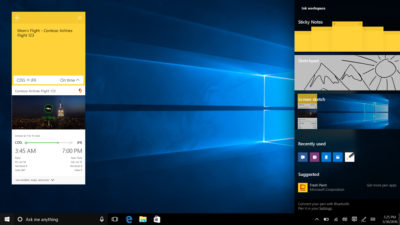
Using a digital pen to write and scribble on the screen of Windows 10 PCs and tablets will get easier.

In a boost to devices that support such pens, such as the Microsoft’s Surface tablet, the OS’ new Windows Ink feature will allow users to jot down notes on the screen without unlocking the device.

Windows Ink will also allow users to write messages on sticky notes and, if appropriate, have them automatically translated into calendar appointments and reminders.

Support for Windows Ink in Microsoft Office, Maps, the Edge browser and other apps will allow users to draw, write and annotate using their pen. Windows Ink will make using the pen in Office more satisfying than it currently is, for example tidying up highlighted marks on documents so they neatly align with text.

Windows 10 will also gain the Ink Workspace, a hub for launching apps that support writing and sketching using the Surface Pen.

Ink everywhere
win10-inking-SJTechies

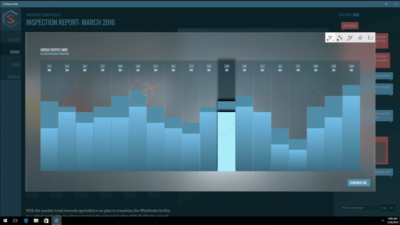
Support for drawing, writing and annotating using digital pens will likely come to many apps.

Microsoft says that support for Microsoft Ink will be easily added to Universal Windows Platform apps, requiring just two lines of XAML code.

Digital ruler

win10-ruler-SJTechies

It sounds simple, but the new on-screen ruler should prove to be a useful addition for those who want to draw straight lines using a digital pen.

Smarter Cortana

The attraction of a virtual assistant is the simplicity with which they allow you to carry out tasks.

To ease the process of using Windows 10’s Cortana, the voice-controlled assistant will no longer require you to log into Windows, with users able to make a note, play music or set a reminder from the lock screen.

Cortana will also become more proactive and make suggestions based on a user’s past behaviour – offering to order lunch or to arrange transportation.

More apps will also be able to use Cortana to automatically complete tasks for users or to carry out actions based on context, such as the user’s current location or time of day.

Windows Hello comes to apps and the web
hello-SJTechies

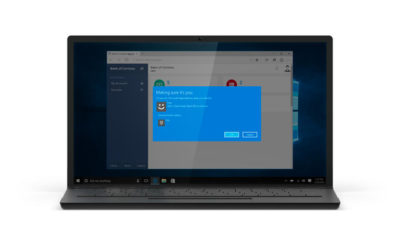
Windows 10 already lets you log into the OS using your face.

The anniversary edition will extend this biometric log-in to Windows apps and websites via Microsoft Edge. As with the OS, users will be able to authenticate their identity using a facial, iris or fingerprint scan.

Another new feature will allow users to unlock a PC running Windows 10 Enterprise Edition by tapping a Windows Hello-enabled phone, although Microsoft has said the feature will only be available on “select premium phones”.

Android app notifications on Windows 10

In future, notifications on Android devices will be able to show on Windows 10 PCs.

Any notification popping up on the Android notification panel can, via the Cortana Android app, also appear as a notification on a linked Windows 10 desktop.

Microsoft demoed the ability at its recent Build conference for developers.

Browser extensions
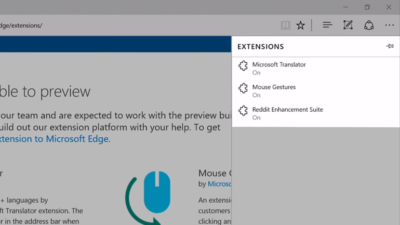
extensions-SJTechies

Microsoft’s Edge browser will soon gain support for extensions.

Extensions are small programs that can be downloaded to add new functionality to a browser, and are already found in Chrome, Firefox and other browsers today.

Support for extensions has already been added to Edge for those testing pre-release builds of Windows 10 under the Insider program.

The first extensions to be supported by Edge are Microsoft Translator, an extension that automatically translates pages in over 50 different languages, an extension to augment mouse gestures support, and a preview version of the Reddit Enhancement Suite.

Microsoft promises more extensions will be added later this year, including AdBlock, LastPass and Evernote.

Pinned browser tabs

pinned-tabs-SJTechies

Microsoft is also adding to Edge the ability to pin your favorite sites and web apps so they always have a tab open in the browser.

Updated Maps app
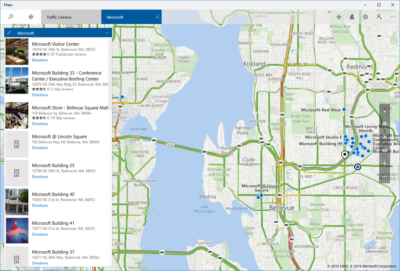
maps-app-pc-SJTechies

The Maps app has several new features, as well as UI and performance improvements.

Additions include one-tap access to search and directions, the ability to view multiple searches and directions at the same time, labels for search results on the map and turn-by-turn directions read by Cortana.

The improved app is available now to those testing Windows 10 under the Insider program.

Access Linux command-line tools in Windows

bash-win10-SJTechies

More one for developers, Microsoft is also bringing the ability to run the Bash shell to Windows.

The Bash shell is a command line interpreter that is available on many different Linux distributions, as well as Mac OS X.

The shell includes a host of tools that allow power users to carry out and orchestrate complex chains of commands.

Bash will be available via a Universal Windows Platform app, which will provide an image of the Linux distribution Ubuntu and run on the Windows 10 desktop.

Users will be able to use the Bash shell to download and install programs from the command line, as they do from inside Ubuntu. Microsoft says Ubuntu software will run as fast in the Windows app as it does natively, thanks to a software subsystem for handling Linux system calls.

Microsoft has described the app as offering a developer toolset. While it has access to the files on the Windows PC, the app only provides access to a command line — not a graphical desktop — and reportedly has limits on what it can be used for, such as not being able to run a server.

Have questions?

Get answers from Microsofts Cloud Solutions Partner!
Call us at: 856-745-9990 or visit: https://southjerseytechies.net/

South Jersey Techies, LL C is a full Managed Web and Technology Services Company providing IT Services, Website Design ServicesServer SupportNetwork ConsultingInternet PhonesCloud Solutions Provider and much more. Contact for More Information.

To read this article in its entirety click here.

Windows tip of the week: Simplify password management

Manage your saved passwords:

Windows regularly offers to save passwords on your behalf. When you connect to a server on your network with a username and password other than the one you logged in with, for example, you’re prompted to save the credentials for reuse. Likewise, Internet Explorer and Edge allow you to save passwords so you can enter them automatically when you return to that page.

Those passwords are saved in a secure location that only you can open, using a well-hidden tool called Credential Manager.

You’ll find this option in Control Panel, under the User Accounts heading. In Windows 8.1 and Windows 10, it’s easier to just type credential in the search box and click Credential Manager at the top of the search results.

Separate icons at the top of the Credential Manager list let you view and manage saved Web credentials and Windows credentials. The Web Passwords list can’t be sorted and there’s no search option, so you’ll have to scroll through the list to find a specific entry. Click the down arrow to the right of any entry to see the saved username and password and click Remove if you don’t want that password stored. (The only way to change a saved password is to remove it and then save it by entering the new password in your web browser.)

The Windows Credentials screen offers Edit and Remove buttons for every entry, along with a handy option to back up and restore saved credentials. That’s a small timesaver when you’re setting up a new PC.

Have questions?

For More Tips & Info from Microsoft Cloud Solutions Partner!
Call us at: 856-745-9990

TECHIES is a full Managed IT Services Company headquartered in Marlton, New Jersey for over 20 years with a new location opening soon in Wilson, North Carolina. TECHIES provides Managed IT Services, Cybersecurity Solutions, Website Design ServicesDedicated Server SolutionsIT ConsultingVoIP Phone SolutionsCloud Solutions, Network Cabling and much more.

Get an early look at the new Office 365 admin center

Tracking and reporting activity in Office 365 using the built-in admin tools is about to get much better. Here’s what the revamped admin center has to offer.

Gathering usage information about Microsoft Office 365 in an enterprise is limited by the available admin tools. To make matters worse, as Microsoft adds new applications to Office 365, the ability to track if, and how, users were consuming the new features has been even more difficult. But with the rollout of the new Office 365 admin center in March 2016, those limitations are quickly disappearing.

Reporting

At first glance, you may think the main activity for any Office 365 admin is adding and subtracting employees from the active roster. But a good admin should be doing much more.

As the number of applications in Office 365 has grown substantially in recent years, the need to track all Office 365 activity has also grown. This need to track activity is especially important in larger enterprises where mishandled resources can raise overall costs significantly.

For example, knowing how many employees actually use Yammer on a weekly basis, and when, could help admins predict when resources will be taxed the most. Or tracking how users are actually using collaboration tools like Skype and Delve may lead an admin to conclude that more training on those applications is needed because the apps are underutilized. These are the sort of questions the new Office 365 admin center is looking to answer.

By simplifying the interface and creating ready-to-use dashboards, Microsoft is trying to streamline the reporting process. Tracking email activity and other peak usage data is just a few clicks away. And as the new Office 365 admin center is rolled out, there will also be tools admins can use to create custom reports.

Speaking from personal experience, the new admin dashboard interface is a welcome improvement. Navigation in the new admin center closely matches the familiar navigation system of other Office 365 apps. The previous admin center, with its heavy use of linked text, looked almost tacked on as an afterthought.

officeadmin365-SJTechies

Rollout

The new Office 365 admin center is rolling out in the United States right now and will be the default reporting experience very soon. The new center will roll out to other parts of the world in April 2016.

If you’re not ready for the change, you can roll back to the old admin system during this introductory phase. On the other hand, if you’re anxious for a change, you can click the Get A Sneak Peek link at the top of the old Office 365 admin center to force the installation of the new system.

Bottom line

For most users, administering Office 365 is someone else’s responsibility, but that does not diminish its importance to an enterprise.

A good admin should be able to track what activity is taking place within Office 365 and, more important, what activity is not taking place. Knowing who uses what applications for how long, and when, is essential information. Armed with that knowledge, administrators can determine how to better allocate resources and where new training for users may be required.

With the rollout of the new Office 365 admin center, Microsoft is using feedback received from its customers to create tools and dashboards that it hopes will make the tracking of vital activity data in Office 365 an easily achieved reality.

Have questions?

Get answers from Microsofts Cloud Solutions Partner!
Call us at: 856-745-9990 or visit: https://southjerseytechies.net/

South Jersey Techies, LL C is a full Managed Web and Technology Services Company providing IT Services, Website Design ServicesServer SupportNetwork ConsultingInternet PhonesCloud Solutions Provider and much more. Contact for More Information.

To read this article in its entirety click here.

3 new iOS 9.3 features business users will love

iOS 9.3 offers several features that might appeal to business-oriented Apple users.

Apple introduced a new version of iOS on Monday. The update includes several new features, including updates to CarPlay and HealthKit, as well as a feature to make it easier for iPads to be used in schools for educational purposes. There are several other new features which are particularly appealing to the business-oriented user.

Here are 3 new features business users should check out.

ios93SJTechies

Night Shift

The proliferation of devices like tablets and smartphones means that some sort of screen is never far away. For many, looking at a screen is the first and last thing they do in the morning and evening.

The problem with that is screens emit blue light, which reduces the amount of melatonin produced in the body. Melatonin is a chemical that helps people fall asleep. The light emitted from smartphones can also cause eye strain, which carries symptoms like headaches and blurred vision.

With this latest version of iOS 9, Apple introduced Night Shift, a feature that automatically adjusts the colors of your display at night. You can schedule times for it to go into effect, manually turn it on and off, and adjust colors on a scale of less warm to more warm.

You can access Night Shift through Settings | Display & Brightness, or through the menu that swipes up from the bottom of the device’s screen.

ios9SJTechies

Password-protected Notes

Notes is iOS’ app for taking, well, notes. iOS 9.3 updates it by allowing users a layer of security. Now, users can lock their notes using either a password or the Touch ID, which makes the app that much more useful.

In order to lock a note, tap the button in the top right corner (the one you might use if you were going to email the note) and then tap Lock Note. When prompted, enter a password, confirm it, and decide if you want to enable the Touch ID. A lock button will appear at the top of the note and in the future if you want to open it, enter the password or use the Touch ID.

ios92SJTechies

More personalized News

The News app now offers more personalization for users, and on a range of topics and publications. So for example, you can select a topic like mobile apps or internet privacy. You can access news by opening the News app, or by swiping right from your main screen.

Have questions?

Get answers from Microsoft Cloud Solutions Partner!
Call us at: 856-745-9990

TECHIES is a full Managed IT Services Company headquartered in Marlton, New Jersey for over 20 years with a new location opening soon in Wilson, North Carolina. TECHIES provides Managed IT Services, Cybersecurity Solutions, Website Design ServicesDedicated Server SolutionsIT ConsultingVoIP Phone SolutionsCloud Solutions, Network Cabling and much more.