If you’ve ever owned a PC with a DVD drive, you may get a $10 settlement

Don’t expect your money anytime soon, however.

DVD drives may be a thing of the past, but the past could pay you $10 via a proposed settlement from a class-action suit.

If you purchased a DVD-ROM, DVD-RW or combination drive between April, 2003 and December 31, 2008, a collection of DVD drive manufacturers have tentatively agreed to pay you $10 per drive, whether you purchased the drive as part of a PC or by itself. You’ll simply need to visit the claim site and testify (under penalty of perjury) that you indeed purchased those drives within the given time period, and live in one of the 23 states (plus the District of Columbia) covered by the suit. The deadline to file is July 1.

Why this matters: Though the optical drive market continues to decrease—“the physical disk format is somewhat obsolete in the era of content streaming,” IDC wrote last year—that wasn’t the case fourteen years ago, when virtually all software was distributed via DVD-ROM. Fortunately, the settlement site isn’t asking for proof of purchase yet, but it reserves the right to do so. Filing a claim can take literally seconds, but don’t hold your breath—you’ll probably receive compensation, but there’s no guarantee.

The Wheels of Justice Turn Slowly

Simply put, a group of 23 plaintiffs sued virtually every DVD drive manufacturer, alleging that they collectively conspired to keep drive prices higher than they normally would be, in violation of antitrust laws. Though the defendants denied they did anything wrong, several—Hitachi-LG, Panasonic, NEC, and Sony—settled and agreed to pay a collective total of $124.5 million into four separate settlement funds.

(Note that only DVD drives for PCs are covered; a DVD player, such as the one gathering dust in your living room, isn’t.)

If you do submit a claim, however, the chances of receiving your settlement soon are slim. That’s because seventeen more defendants, including various subsidiaries of BenQ, Philips, Samsung, TEAC, and Pioneer, have yet to settle, and the suit will continue until all of the claims are resolved.

“Because other defendants remain in this litigation, the plaintiffs are proposing that distribution of the settlement funds not occur at this time,” the settlement site reads. “This is to save the expenses associated with distribution.”

In fact, the settlement hearing to finally approve the Hitachi-LG-Panasonic-NEC-Sony agreement will be held on December 8. After that, payments may begin—which means that you’ll probably receive your $10 or less a year from now. Yes, less: Payments will be “up to” $10 per drive, according to the claims site.

You should probably treat the settlement like one of those “print out your own rebate” slips from the turn of the century. Even under the best of circumstances, chances are you’ll have totally forgotten about your $10 windfall by the time the check arrives.

Have questions?

Get answers from Microsoft Cloud Solutions Partner!
Call us at: 856-745-9990

TECHIES is a full Managed IT Services Company headquartered in Marlton, New Jersey for over 20 years with a new location opening soon in Wilson, North Carolina. TECHIES provides Managed IT Services, Cybersecurity Solutions, Website Design ServicesDedicated Server SolutionsIT ConsultingVoIP Phone SolutionsCloud Solutions, Network Cabling and much more.

Apple’s bold new red iPhone 7 turns upgrading into a philanthropic decision

iPhone SE gets a storage boost, too.

Apple just made upgrading to an iPhone 7 a philanthropic decision by adding a red special edition to the lineup. The new red aluminum finish, which is available to order for both iPhone 7 and 7 Plus in-store and online on March 24, is a fundraising effort for the Global Fund. Apple will contribute a portion of red iPhone sales to the fight against AIDS and HIV.

Read More

Exclusive offer from BigBeagle.com

Exclusive offer from: BigBeagle.com  |  24/7 Support: 8885051532
Amit Shah — Customer Number: 57156051

BigBeagle is a reseller of GoDaddy and offers GoDaddy products at a discounted price. Don’t forget to visit our coupon page at http://bigbeagle.com/coupons for the latest and greatest promotions.

Save up to 10% on all new purchases of $20 or more, great products just for you. Hurry before the offer expires.

Use promo code rs117a6 in your cart when you order.

*Some limitations apply. Applicable to new purchases only. Enter promo code into shopping cart to see full details. Minimum purchase of $20 required. Offer expires Wednesday, April 12, 2017 at midnight (Mountain Time).

Copyright © 2017 BigBeagle.com. All rights reserved.

Here’s what’s coming next from Sling TV

Sling TV CEO Roger Lynch talks pricing, DVR, and certified hardware.
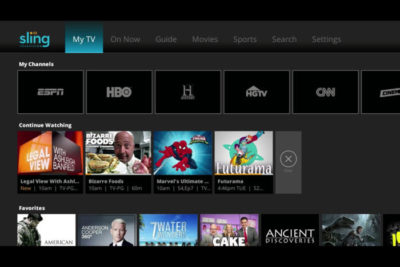
A lot’s changed in the two years since Sling TV made its grand debut at CES 2015. Instead of being the only streaming option for cable channels like ESPN and CNN, Sling is now one of three options alongside PlayStation Vue and DirecTV Now, and it will soon have a fourth competitor in Hulu.

Accordingly, Sling has changed with the times. The company, a subsidiary of Dish Network, has added new channels, created a second base package with a different mix of channels, and is working on a cloud DVR feature.

What else is in store for Sling this year? Here’s what we learned from Roger Lynch, Sling’s CEO, during CES 2017:

On DVR, which is “months” away

Sling began testing DVR service in an invite-only beta on Roku devices last month, and while it’s clearly a work in progress, Lynch says feedback has been positive. “The only feedback that isn’t positive is, ‘I wish I had this feature or that feature,’ all of which are being built already anyway,” Lynch says.

For now, Sling is prioritizing simple improvements like grouping recordings from a series into a folder, rather than listing them all separately. The eventual goal is to list all episodes from a series—whether it’s on-demand, recorded, or live—in a single window.
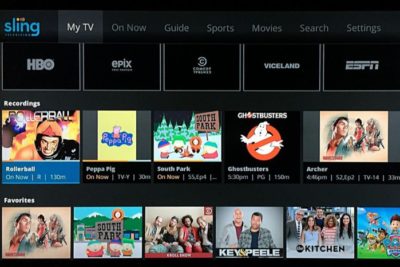
Still, Lynch gave only a rough time frame for when DVR might launch publicly, “It’s not in weeks. It’s not in years. It’s in months,” he says. “We want to get it out as quickly as possible.”

On AirTV and “Optimized for Sling TV”

Just before CES began, Dish announced a new brand called AirTV. Its first product, the AirTV player, puts Sling TV front-and-center, while integrating over-the-air channels and Netflix recommendations into the Sling guide.

Lynch sees AirTV as an example for other device makers to follow. “I’m hopeful that other device partners will make devices similar to this, and do similar types of integrations for Sling, and that it’ll spur innovation in the ecosystem,” he says.
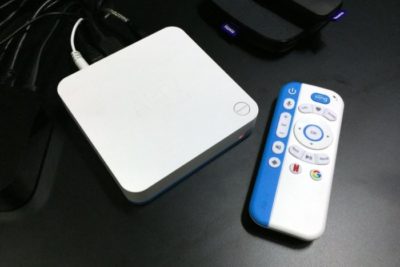
To that end, Sling’s sole CES announcement was an “Optimized for Sling TV” certification program, which will help consumers know whether a device works well with the service. With streaming devices, for instance, criteria could include a Sling button on the remote control, integration with over-the-air broadcasts in the Sling guide, and a way to auto-launch Sling when users turn on the device.

Lynch says Sling is still finalizing how it’ll enforce those criteria. Roku, for instance, pre-loads the Sling app and includes a quick-launch remote button on some models, and that might be enough to earn Sling’s approval. Other types of devices may have different criteria.

“There’s router companies that are looking to be optimized for Sling. So what does that mean for router companies? It doesn’t meant they’re going to integrate OTA and put a button on the remote. It means they’re going to do something to optimize for the experience,” Lynch says.

On separating Sling Orange and Blue

Last year, Sling introduced a second base package, separate from its original $20-per-month plan. The newer plan is called Sling Blue, and it starts at $25 per month, while the original is now called Sling Orange. (Subscribers can bundle the two plans, which have different channel lineups with some overlap, for $40 per month.)

Might Sling eventually try to merge these two plans?

“We work really, really hard not to combine them,” Lynch says. “The problem with combining them is, you end up with a $35 to $40 package because there’s so much content, and you price yourself out of the market from where I think the big opportunities [are].”

That sounds like a shot at rivals like PlayStation Vue, DirecTV Now, and Hulu, none of whom are attempting to match Sling’s base prices. “For us, the Sling Orange product is the perfect cord-cutter product. It’s great for people who use antennas because you’re not forced to buy locals, and locals are really expensive,” Lynch says.

Sling Blue, meanwhile, will likely compete more directly with those larger bundles over time. “That’ll become a broader content package at a higher price point,” Lynch says.

On getting what it wants from TV networks

Since its launch in 2015, Sling has offered a “Replay” feature that lets users rewind live TV and watch several days’ worth of past programming. It’s a nice alternative to setting up a DVR, but not every channel supports the feature.

As you might expect, that’s partly because of issues with streaming rights. But Sling is working on accommodating those issues so it can support Replay on more channels.

“Every program has different requirements, like, can you fast forward, can you not fast forward, yes you can fast forward, but not through commercials,” Lynch says. “There are channels that have granted us rights to Replay, but we haven’t made Replay available on the channel yet, because we still have to put in some technology to enable that, because of the business rules that channel has.”

On the whole, though, negotiating those sorts of features with TV networks is getting easier. Lynch notes that two years ago, Sling was scrambling just to get a basic package together—the service launched with a mere 11 channels—but now TV networks are much more interested.

“When we first launched,” Lynch says, “we didn’t have as much leverage to demand things like that as we do now.”

Have questions?

Get answers from Microsofts Cloud Solutions Partner!
Call us at: 856-745-9990 or visit: https://southjerseytechies.net/

South Jersey Techies, LL C is a full Managed Web and Technology Services Company providing IT Services, Website Design ServicesServer SupportNetwork ConsultingInternet PhonesCloud Solutions Provider and much more. Contact for More Information.

To read this article in its entirety click here.

Exclusive offer from BigBeagle.com

Exclusive offer from: BigBeagle.com  |  24/7 Support: 8885051532
Amit Shah — Customer Number: 57156051

BigBeagle is a reseller of GoDaddy and offers GoDaddy products at a discounted price. Don’t forget to visit our coupon page at http://bigbeagle.com/coupons for the latest and greatest promotions.

Save up to 15% on all new purchases, great products just for you. Hurry before the offer expires.

Use promo code rs117a5 in your cart when you order.

*Some limitations apply. Applicable to new purchases only. Enter promo code into shopping cart to see full details. No minimum required. Offer expires Wednesday, March 29, 2017 at midnight (Mountain Time).

Copyright © 2017 BigBeagle.com. All rights reserved.

Symantec Endpoint Protection (SBE)- Upgrading the cloud agent

Symantec has recently become aware of a medium vulnerability in older versions of the server agent. The latest version addresses this vulnerability in new installations and was released February 15th, 2017. Server agents that are not already upgraded will be identified in the SEP SBE cloud management console starting on March 8th. A manual upgrade will be required to ensure you have the latest protection.

Read More

Cyber Ransom Attacks in 2016

Ransom is the top motivation behind cyber attacks, according to a report from Radware, and IT professionals are most concerned about data loss. Here’s what you need to know.

Nearly half of businesses report that they were the subject of a cyber-ransom campaign in 2016, according to Radware’s, Global Application and Network Security Report 2016-2017.

Data loss topped the list of IT professionals’ cyber attack concerns, the report found, with 27% of tech leaders reporting this as their greatest worry. It was followed by service outage (19%), reputation loss (16%), and customer or partner loss (9%).

Read More

Exclusive offer from BigBeagle.com

Exclusive offer from: BigBeagle.com  |  24/7 Support: 8885051532
Amit Shah — Customer Number: 57156051

BigBeagle is a reseller of GoDaddy and offers GoDaddy products at a discounted price. Don’t forget to visit our coupon page at http://bigbeagle.com/coupons for the latest and greatest promotions.

Save up to 15% on all new purchases, great products just for you. Hurry before the offer expires.

Use promo code in your cart when you order.

*Some limitations apply. Applicable to new purchases only. Enter promo code into shopping cart to see full details. Offer expires Wednesday, March 15, 2017 at midnight (Mountain Time).

Copyright © 2017 BigBeagle.com. All rights reserved.

What did Microsoft get right in 2016?

2016 was a very good year for Microsoft in terms of decision making. Here is a  list of five things the company got right.

Since its inception way back in the ancient epoch known as the 1970s, Microsoft has often been ridiculed for making mistakes. Whether it was for bad business strategies, poor products, or unscrupulous practices, Microsoft seemed to bring out the passionate ire in many people.

But what often gets overlooked is what Microsoft does right each year. And by just about any measurement, 2016 was a remarkable year for the company. Under the leadership of Satya Nadella, Microsoft has changed its business strategy to reflect what it describes as a mobile-first, cloud-first business world. And in 2016, that strategy began show results.

Here, in no particular order, are five things Microsoft got right in 2016.

1. Windows 10 Anniversary Update

To mark the one-year anniversary of Windows 10, Microsoft released a large patch it dubbed the Windows 10 Anniversary Update. Okay, so Microsoft is not very clever in naming things. But the patch itself was well received. It included new security measures, new program features, Microsoft Edge browser extensions, and advanced support for digital pens, among many other enhancements. If you were already using Windows 10, the Anniversary Update was a must.

2. Surface Studio

While not its primary business, Microsoft has been developing some noteworthy pieces of hardware the past few years and in 2016, the company generated a large amount of buzz with the release of the Surface Studio. This elegant computer combines the best of the desktop, laptop, and tablet to create a unique and innovative platform perfect for artists, designers, and other creative people. With data visualization becoming ever more important, Microsoft may have invented the perfect tool for the big data generation.

3. Microsoft Office 365

I have been wondering aloud if it is a bit too much, but there can be no doubt that with the dozens of program and feature updates released in 2016, Microsoft Office 365 is the alpha and omega of productivity software. Rather than trying to name all of the new features, it would be best to concentrate on the underlying theme: collaboration. Whether it is Yammer, Skype for Business, or the intelligent cloud, Microsoft is concentrating on features necessary for success in a collaborative environment.

4. LinkedIn

In 2016, Microsoft made several acquisitions of both companies and their technologies. Perhaps the most high-profile of these acquisitions was LinkedIn. Despite all of its efforts to create a collaboration platform with Office 365, the one thing Microsoft needed was a social networking component. LinkedIn gives the company a jump start toward establishing a social networking presence that can compete with the likes of Twitter and Facebook. It will be interesting to see what Microsoft does with this acquisition.

5. IoT, AI, and machine learning

While we may live in a mobile-first, cloud-first world right now, the future may very well revolve around the Internet of Things (IoT), artificial intelligence, and machine learning. To its credit, Microsoft sees the potential of these technologies and has taken steps to get ahead of the curve. In terms of recent history, getting ahead of the curve is not something Microsoft has done very well, so it is difficult to know where the research will lead, but it should prove to be worth watching closely.

Despite what some people may tell you, Microsoft does do some things right. In fact, for the most part, the company does more things right than it does wrong. In 2016, Microsoft did many things right and consumers and businesses have been the beneficiaries. Let’s hope Microsoft can continue the trend in 2017.

Have questions?

Get answers from Microsofts Cloud Solutions Partner!
Call us at: 856-745-9990 or visit: https://southjerseytechies.net/

South Jersey Techies, LL C is a full Managed Web and Technology Services Company providing IT Services, Website Design ServicesServer SupportNetwork ConsultingInternet PhonesCloud Solutions Provider and much more. Contact for More Information.

To read this article in its entirety click here.

Windows Tip of the week: How to turn hibernation on and off

How to turn hibernation on and off:

When your PC goes to sleep, it enters a low-power state, ready to spring back into action when Windows detects a tap on the keyboard or determines that it’s time to run a scheduled task. If you’re planning to be away from the PC for a while, you might prefer to save the current state so that you can restore it quickly, without the chance that the computer will wake up on its own.

There’s an option that lets you save the contents of memory to a hibernation file and then shuts down the PC, so it uses no power at all. When you restart, Windows restores the system state from the hibernation file.

To enable or disable hibernation, open a Command Prompt window and enter the powercfg command with the -h switch. Type powercfg -h on to enable hibernation; substitute the word off to disable it.

Normally, the Hibernate option is hidden from the Shutdown menu. To make it visible, open Power Options in Control Panel and then click Choose What The Power Buttons Do. Under the Shutdown Settings heading, select the Hibernate checkbox to display it in the Power menu.

Have questions?

For More Tips & Info from Microsofts Cloud Solutions Partner!
Call us at: 856-745-9990 or visit: https://southjerseytechies.net/

South Jersey Techies, LL C is a full Managed Web and Technology Services Company providing IT Services, Website Design ServicesServer SupportNetwork ConsultingInternet PhonesCloud Solutions Provider and much more. Contact for More Information.