The end is near: Say goodbye to the Windows 10 free upgrade

The deadline for a free Windows 10 upgrade is right around the corner. Find out what happens after the offer expires.

Windows 10-July29

Don’t look now, but July 29, 2016, is coming up fast. That is the one-year anniversary of the release of Windows 10, which means the ability to upgrade to the new operating system for FREE will soon expire. (If you are interested, you can take a look at the official countdown here.)

In a January 21, 2015, Windows Experience blog post titled The next generation of Windows: Windows 10, we learned that Windows 10 would be a free upgrade. Author Terry Myerson said:

Today was a monumental day for us on the Windows team because we shared our desire to redefine the relationship we have with you—our customers. We announced that a free upgrade for Windows 10 will be made available to customers running Windows 7, Windows 8.1, and Windows Phone 8.1 who upgrade in the first year after launch.


Read More

iPhone 7 rumors: Goodbye 16GB, hello 256GB and ‘Pro’ line

The new iPhone doesn’t come out until September, but that won’t stop the rumor mill from churning at a furious pace.

Now that WWDC is over, the iPhone 7 rumors are getting even louder, since its expected unveiling in September is probably the next time we’ll see Tim Cook on stage. Yes, that’s still a good while from now. To help keep track of all the scuttlebutt, we’re collecting every rumor we’ve heard so far—and every new one that crops up between now and the day Tim pulls the new iPhone out of his pocket. Then we’ll assess whether each rumor seems legit or absurd, and we’d love to hear your thoughts too. Sound off in the comments.

What’s the latest?

The rumor: Pricing specs for the upcoming iPhone 7 have allegedly leaked on Weibo, according to 9to5Mac. If believed, the specs show that Apple is looking to release a 256GB model of the iPhone 7 that will be the same price as the 128GB model of the current generation iPhone 6s. Furthermore, Apple would drop the meager 16GB models, offering instead 32GB, 64GB, and 256GB for the iPhone 7 and 32GB, 128GB, and 256GB for iPhone 7 Plus. And that’s not all, the rumor on Weibo has it that Apple is gearing up an iPhone 7 Pro line. This Pro model would be the only one to offer the dual-camera system that’s been rumored before, and a Smart Connector for accessories similar to the iPad Pro.

Plausible: Generation after generation, Apple has mostly retained the same pricing for iPhone models, so the fact that the 256GB iPhone 7 would cost the same as the current 128GB wouldn’t be unheard of. However, we’re a little skeptical that Apple would get rid of the 16GB base models, especially since iOS 10 seems to have been designed to optimize storage. And the Pro line would be an interesting addition, and would certainly make up for the fact that the iPhone 7 is rumored to be almost-identical to the 6s models. Apple is also making some strides in enterprise software, so an iPhone Pro would be a logical next-step.

Headphone jack after all?

The rumor: Via Engadget comes some component photos from Rock Fix, a smartphone repair shop in China. They allegedly show a dual-SIM tray, another shows a dual-lens camera for the larger Plus model, and curiously, there’s even an Lightning assembly that still has the headphone jack attached. People who need a lot of storage will be pleased to hear another photo shows SanDisk memory ships up to 256GB, which would be the most storage Apple’s ever offered in an iPhone.

Plausible? It’s hard to give much weight to photos of components, and as reported in the same Engadget article, conflicting rumors about the dual-lens camera surfaced within days. But it is plausible that these components could be for the iPhone 7—and we know plenty of people who would be thrilled if the new phone had a headphone jack after all.

New colors?

The rumor: It’s not easy being green, and iPhone owners might be starting to get envious of how many colors you can get an Android phone in. iPhones used to be pretty monochromatic, until Apple added gold and then an even brighter splash of color with last year’s rose gold hue (OK, OK, it’s pink). Japanese blog Macotara is reporting that Apple is switching it up this year, swapping the space gray color for navy blue instead.

Plausible? This is absolutely plausible. Apple’s iPhones have never been colorful, but the iPod touch comes in beautiful colored aluminum, and Apple has also set a tradition recently of switching up its Apple Watch bands to fit the season. One of the latest additions is a handsome navy Sport Band, and the Classic Buckle, Leather Loop, Modern Buckle, and two of the Hermès bands come in navy too. Navy looks great on both men and women, but we can’t help being a bit surprised it’s the “basic black” space gray color that’s rumored to be replaced.

A flat Home button?

The rumor:  Blurry, possibly fake spy photos from mobipicker (via 9to5Mac) seem to show a very flat-looking Home button. As in, maybe it’s not a button, maybe it’s just a touch-sensitive place you touch (and/or 3D Touch) instead of physically clicking it.

A fully flat Home button could have 3D Touch potential too.

Plausible? The Touch ID button got a lot faster between the iPhone 6 and 6s, but any button that physically clicks is another opportunity for hardware failure. With the rise of installment plans and the iPhone Upgrade program, we expect Apple to keep making little tweaks that make its phones more durable, so they’re turned in good enough shape to be possibly refurbished and resold. So yes, this is very plausible, and we think Apple could pull it off where the experience is the same, perhaps even using a little haptic feedback to make it feel like the button is clicking but it’s not—just like the Force Touch trackpad.

Read More

Microsoft is buying LinkedIn for a whopping $26.2 billion in big data push

Microsoft announced that it will be acquiring LinkedIn Corporation for $196 per share in an all-cash deal, gaining access to the social platform and its data.

linkedin


Microsoft announced that it will be purchasing LinkedIn, the social network for professionals, for $26.2 billion. The all-cash deal will bolster Microsoft’s social media presence among professionals and could potentially give LinkedIn more analytics resources.

In the official press release announcing the acquisition, it was noted that LinkedIn will remain its own entity and CEO Jeff Weiner will stay at the helm. Weiner will report to Microsoft CEO Satya Nadella.

Despite the astronomical price, one of the most basic reasons for Microsoft’s pursuit of LinkedIn is to grow its appeal among business users. LinkedIn is the world’s biggest site for networking and job searches with roughly 400 million users, and Microsoft will get direct access to that audience and the data it is creating.

Speaking of data, LinkedIn stands to benefit from this deal as well. Microsoft’s press release, pointed out that LinkedIn has updated its mobile app to help “deliver better business insights,” which it could continue to do with Microsoft’s help.

Of course, a big part of LinkedIn’s publishing platform was built around its acquisition of Pulse in 2013. And, in 2015, LinkedIn announced analytics for publishing to help brands and professionals better understand the reach of their posts.

After Microsoft bought Yammer in 2012, it is integrating a host of Yammer capabilities into Office 365 and we may see the same thing from the LinkedIn deal. In a letter written by Nadella to employees explaining the deal, he cited growth in “Office 365 commercial and Dynamics” as one of the goals of the deal, as well as growth in cloud services.

“This deal brings together the world’s leading professional cloud with the world’s leading professional network,” Nadella wrote. “I have been learning about LinkedIn for some time while also reflecting on how networks can truly differentiate cloud services.”

Additionally, Nadella noted that the combination could lead to an interesting overlap between the two brands relative to specific projects or tasks.

“This combination will make it possible for new experiences such as a LinkedIn newsfeed that serves up articles based on the project you are working on and Office suggesting an expert to connect with via LinkedIn to help with a task you’re trying to complete,” Nadella wrote. “As these experiences get more intelligent and delightful, the LinkedIn and Office 365 engagement will grow. And in turn, new opportunities will be created for monetization through individual and organization subscriptions and targeted advertising.”

One other option could be for Skype integration for LinkedIn to help with video interviews for job candidates, but also to assist with learning through the Lynda.com brand. LinkedIn bought Lynda.com back in 2015, which means that Microsoft gets access to the popular training platform and its audience as well.

The deal is expected to be completed sometime in 2016. Microsoft expects that LinkedIn’s financials will be reported as part of its Productivity and Business Processes segment.

The 3 big takeaways for readers

  1. Microsoft announced that it has purchased LinkedIn, the professional social network, for $26.2 billion dollars in order to further integrate the two companies’ technologies.
  2. In a letter penned by Microsoft CEO Satya Nadella, he specifically pointed out the integration will focus on “insights” and “cloud platforms.”
  3. Microsoft also gets access to the data generated by LinkedIn users around job searches, as well as access to LinkedIn’s training platform, Lynda.com, and its audience and data.

Have questions?

Get answers from Microsofts Cloud Solutions Partner!
Call us at: 856-745-9990 or visit: https://southjerseytechies.net/

South Jersey Techies, LL C is a full Managed Web and Technology Services Company providing IT Services, Website Design ServicesServer SupportNetwork ConsultingInternet PhonesCloud Solutions Provider and much more. Contact for More Information.

To read this article in its entirety click here.

Microsoft makes it easier for firms to keep running Windows 7

The technology giant releases a bundle of updates for the seven-year-old operating system in the latest move designed to appeal to businesses in no rush to move to Windows 10.

windows-7prof-logo

Microsoft has taken another decision that should make it easier for businesses to continue running Windows 7.

The technology giant announced the release of the Windows 7 SP1 convenience rollup, a collection of security and other updates for the seven-year-old operating system. The release includes core Windows fixes, security fixes and hot fixes that have been issued since Service Pack 1 was released in 2011 and is designed to simplify the updating process.

Microsoft’s decision to release the bundle is a departure from the firm’s stance earlier this year, when it said it had no news on the promised convenience rollup of fixes for Windows 7, stressing instead “the success our customers are experiencing upgrading to Windows 10”.

The release follows another recent choice by Microsoft to dial back pressure on businesses to move to Windows 10. At the beginning of the year, Microsoft announced it would phase out support for Windows 7 and 8 on new PC hardware. The move seemed designed to encourage businesses not to downgrade new Windows 10 machines to an earlier OS, as has been common in the past in order to standardize corporate hardware. However, Microsoft later watered down the plans, pushing back the point at which it will end full extended support for Windows 7 and 8.1 machines running on Intel’s Skylake CPUs.

Richard Edwards, principal analyst for Enterprise ICT at Ovum, said Microsoft’s recent decisions are an acknowledgement of how many businesses still run Windows 7 and how long it will likely take them to switch.

“Most organizations are still in the early planning stage when it comes to Windows 10. This means that most of the PCs running Windows 10 today are in the consumer segment of the market, and thus Windows 7 is probably running on 80 percent-plus business Windows PCs,” he said.

Inside enterprises, Windows 7 is “going to be around for many years to come,” he said. “Microsoft has to find ways to please and delight these enterprise customers, and easing the burden on IT departments is one way to do this.”

While Edwards believes the release of the Anniversary Edition update to Windows 10 will drive upgrades by early adopters, he predicted that mass adoption is still some way off, forecasting that the bulk of firms will migrate from mid-2017 through to 2020.

“Organizations will only upgrade to Windows 10 if they have a clear insight into its business value,” said Edwards, adding that key business features such as Enterprise Data Protection were still not in place.

Microsoft’s focus on driving customers to Windows 10 has earned it criticism from small businesses, which recently complained about the decision to push the aggressive Get Windows icons and pop-ups to domain-joined PCs.

Analyst house Gartner had predicted that adoption of Windows 10 by business would be “significantly more rapid” than that of Windows 7 but this year was more cautious, claiming that flat IT budgets are pushing the start of enterprise migrations back to 2017.

“It’s to do with current budget restrictions as much as anything. They [budgets] are not being made available,” said Gartner research director Ranjit Antwal at the time.

There is little third-party data on the rate of adoption of Windows 10 by business, although Microsoft claims enterprises are switching more rapidly than they did to Windows 7.

Have questions?

Get answers from Microsofts Cloud Solutions Partner!
Call us at: 856-745-9990 or visit: https://southjerseytechies.net/

South Jersey Techies, LL C is a full Managed Web and Technology Services Company providing IT Services, Website Design ServicesServer SupportNetwork ConsultingInternet PhonesCloud Solutions Provider and much more. Contact for More Information.

To read this article in its entirety click here.

10 mechanical keyboards to help make you more productive at work

1. Unicomp Ultra Classic

unicomp-SJTechies

Mechanical keyboards started as a trend among PC gamers but have crossed over into the realm of developers and IT pros. Here are 10 models worth checking out.

Modeled after the grandaddy of all mechanical keyboards, the IBM Model M, the Unicomp Ultra Classic offers the same buckling spring design and a similar aesthetic (which makes sense because Unicomp bought the technology behind the Model M in the 1990s). If you want the reliability of a classic Model M, but don’t want to deal with decades of keyboard funk on a vintage model, go with the Unicomp. But, if you want the nostalgia factor, you can probably find an old Model M on eBay.

2. Das Keyboard 4 Professional

das-SJTechies

Known for its sleek designs and strong build quality, Das is one of the biggest names in mechanical keyboards. The Das Keyboard 4 Professional uses cherry MX switches with gold contacts, and has a design that would fit well in an office environment.

3. Ducky Legend

duckylegend-SJTechies

Ducky is better known for its Shine series of keyboards, but the aluminum case Legend would be more at home in an office setting. The keys are backlit by LEDs and users can choose which switches they want to use.

4. Logitech G710

logitech710-SJTechies

The G710 is a good middle-of-the-road selection from Logitech’s G series keyboards. The G710 uses Cherry MX blue switches for a good mechanical feel, but operates quietly so you won’t disturb your coworkers.

5. Kinesis Advantage

The Kinesis Advantage combines the tactile comfort of Cherry MX brown switches with the support of an ergonomic design. It’s a little on the pricey side, but it comes with a 60 day guarantee.

6. Ultimate Hacking Keyboard

uhk-SJTechies

The Ultimate Hacking Keyboard bills itself as a split design mechanical keyboard for professionals. This keyboard uses Cherry MX switches and has additional modules that can be snapped into place to customize it.

7. Cooler Master MasterKeys Pro L

coolermaster-SJTechies

If you’re after cool lighting options and good performance, consider the Cooler Master MasterKeys Pro L. This keyboard is powered by a ARM Cortex M3 processor and brings a minimal design.

8. Razer BlackWidow

razerwidow-SJTechies

Razer is a big name in the gaming world and their BlackWidow is a mechanical keyboard built for gaming. It uses proprietary Razer switches and gold contact points, and offers lots of lighting options.

9. ErgoDox EZ

ergodox-SJTechies

ErgoDox initially made noise in the keyboard market with its ErgoDox kit that required a lot of assembly, including soldering all the points by hand. The ErgoDox EZ, however, is a ready-made kit based on an open source design that is a nice split design option.

10. CODE Mechanical Keyboard

code-SJTechies

The CODE mechanical keyboard was designed with developers in mind. Using 6-Key USB rollover, it opens up many options for shortcuts.

Have questions?

Get answers from Microsofts Cloud Solutions Partner!
Call us at: 856-745-9990 or visit: https://southjerseytechies.net/

South Jersey Techies, LL C is a full Managed Web and Technology Services Company providing IT Services, Website Design ServicesServer SupportNetwork ConsultingInternet PhonesCloud Solutions Provider and much more. Contact for More Information.

To read this article in its entirety click here.

Chrome turns 50 and stands at a crossroads

As Google reaches a major milestone, let’s reflect on its uncertain future.

google_chrome

Google’s Chrome browser has just reached a major milestone, hitting its 50th release.

For Google, it’s a moment for positive reflection. To emphasize Chrome’s might, the company points to the browser’s 771 billion page loads per month, 1 billion monthly active mobile users, 9.1 billion auto-filled forms, and 145 million malicious webpages averted. One might also point to Chrome’s ever-growing usage, accounting for 47 percent of all worldwide pageviews, including mobile, according to StatCounter.

Indeed, Chrome has become an indispensable tool for many web users, and has served as a leader in the browser world. It introduced the idea of limiting menu clutter around actual webpages, and popularized the syncing of bookmarks, tabs, and browser history across devices. After all these years, it remains PCWorld’s most highly-recommended web browser.

Yet for all the good Chrome has done, Google’s browser now stands at a crossroads. Aside from just another way to browse the Internet, it’s unclear exactly what Google wants Chrome to be.

Browser or platform?

In the beginning, Google’s key tenets for Chrome were speed and simplicity. The browser’s minimal menu system (or “chrome,” hence the name) got out of the way, and its JavaScript engine crushed the competition as websites grew more advanced in the late aughts.

Those advantages are less pronounced now. Nearly every other browser has embraced restraint with their own chrome, and Chrome is no longer the clear victor in benchmarks. Meanwhile, the ever-increasing demands of the modern web have given Chrome a reputation for being a resource hog and a battery killer, even if other browsers aren’t markedly better.

A few years after Chrome launched, Google started broadening its ambitions. It introduced the Chrome Web Store, and eventually the concept of native Chrome apps with offline functionality. A Chrome app launcher followed, along with push notifications from web services and Google Now. These new features were supposed to turn Chrome into a platform-within-a-platform on Windows and Mac, while making Chrome OS into a legitimate desktop operating system.

But over the last year, Google has dismantled or abandoned many of those efforts. The Chrome notification center is now dead on Windows and Mac, as Google considersembracing native notifications on those platforms. The Chrome Web Store fell into disrepair years ago, and Google has shown little interest in cleaning it up. The Chrome app launcher got nixed on Windows, Mac, and Linux because no one was using it.

As for Chrome OS, its future is far from certain. Although the platform has traction in the education world, and probably isn’t going away, a merged Chrome-Android operating system for consumers seems likely.
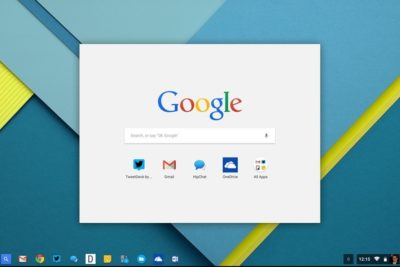
chromeoslauncher

Amid all these retrenchments, Chrome has introduced no big noteworthy features to its desktop browser. The most interesting browser developments are instead happening on alternatives such as Microsoft Edge (with its page annotation and embedded Cortana assistant) and Vivaldi (with its web panels and tab stacking).

Google may arguably be more interested in mobile Chrome, now that smartphone usage has eclipsed the desktop. But in a world of apps, Facebook, and Instant Articles, the idea that users will spend significant amounts of time in a browser seems quaint. Perhaps that’s why Google’s 1 billion mobile user statistic is on a monthly basis, not a daily one.

So as Google celebrates Chrome’s 50th release, it should also ask itself what Chrome is now trying to accomplish. Will it recommit to its original focus on speed and simplicity, or will it try to innovate with new features? Is Chrome a platform unto itself, or just a really good way to access webpages? Are the fates of the desktop and mobile versions intertwined, or are they separate? If Google can’t answer those questions, version 100 might not be so celebratory.

Have questions?

Get answers from Microsofts Cloud Solutions Partner!
Call us at: 856-745-9990 or visit: https://southjerseytechies.net/

South Jersey Techies, LL C is a full Managed Web and Technology Services Company providing IT Services, Website Design ServicesServer SupportNetwork ConsultingInternet PhonesCloud Solutions Provider and much more. Contact for More Information.

To read this article in its entirety click here.

Windows Tip of the week: Maximize CPU performance

Maximize CPU Performance:

If you are using a desktop PC or a notebook that is always plugged in, you might want to maximize your CPU performance by changing your Power Options. Right-click the Start button in the lower-left corner on the Desktop (Or Windows key + X) and navigate to the Power Options menu item. On the screen shown in Figure, click the High Performance radio button. Remember, changing this setting will burn through a battery charge quickly—use it wisely. Oh, and you might want to make changes to the Plan settings too while you are here.

Figure

WindowsQuickTips

Have questions?

For More Tips & Info from Microsofts Cloud Solutions Partner!
Call us at: 856-745-9990 or visit: https://southjerseytechies.net/

South Jersey Techies, LL C is a full Managed Web and Technology Services Company providing IT Services, Website Design ServicesServer SupportNetwork ConsultingInternet PhonesCloud Solutions Provider and much more. Contact for More Information.

Windows Tip of the week: Get a closer look with the Magnifier tool

Use the Windows Magnifier tool to zoom in:

You don’t have to be myopic to occasionally need a closer look at something on your Windows screen. Maybe you want to see more details in a picture. Maybe the font on the web page is too small to read comfortably.

Whatever the reason, help is a keystroke away. Hold down the Windows key and tap the plus sign (on the top row or on the numeric keypad; it doesn’t matter). That instantly zooms the display to 200% of normal. Keep tapping the plus sign to zoom in further. Moving the mouse to the edges of the screen will pan to areas that aren’t visible.

To zoom back out, hold down the Windows key as you tap the minus sign.

Have questions?

For More Tips & Info from Microsofts Cloud Solutions Partner!
Call us at: 856-745-9990 or visit: https://southjerseytechies.net/

South Jersey Techies, LL C is a full Managed Web and Technology Services Company providing IT Services, Website Design ServicesServer SupportNetwork ConsultingInternet PhonesCloud Solutions Provider and much more. Contact for More Information.

Uninstall now! Apple abandons QuickTime for Windows despite lingering critical flaws

Apple is giving up on QuickTime for Windows.

Yet another program is joining Java 6 and Windows XP as big-name software you do not want running on your PC. Security firmTrend Micro and the U.S. Department of Homeland Security are advising all Windows users to uninstall Apple’s QuickTime as soon as possible. (The advisory does not affect Mac users.)

The reason for getting rid of QuickTime for Windows is twofold. First, Apple told Trend Micro it is deprecating the software and will no longer deliver security updates for it. Second, there are two known critical vulnerabilities that could allow an attacker to take control of a system running QuickTime.

That’s a hellacious combo.

Apple was unavailable for comment at this writing, but a quick look at QuickTime’s download page shows the software is still publicly available. It hasn’t been updated since at least January, however.

Trend Micro says it does not yet know of any instances where the two potential security threats are being used in the wild but that could change. Trend Micro’s Zero Day Initiative recently published some technical details about the vulnerabilities. ZDI did this because its disclosure policy requires it to publish threat information when a “vendor indicates that the product is deprecated,” and thus won’t be patched.

If you’re a longtime user of iTunes you may be running QuickTime. To dump the program, open the Control Panel on your PC and then from the “category” view go to Programs > Uninstall a program. Once the list of installed programs populates, scroll down until you find QuickTime. Select it with your mouse, and then click Uninstall towards the top of the window. A pop-up window will then appear asking to confirm that you want to uninstall the program. Click Yes and you’ll be QuickTime-free in no time.

A survey published by Secunia Research in late 2015 found that Apple software is among the programs that are updated the least often by Windows users.

Why this matters: Whenever software is about to be abandoned it’s always a good idea to move away from it—or at least start planning to. That goes double for software with known flaws that allow the bad guys to execute code on your machine. QuickTime used to be an important piece of software for Windows users. But these days you don’t need it to watch movie trailers on Apple’s site and it’s no longer used by iTunes to play media on Windows. There’s little reason for the vast majority of Windows users to keep QuickTime on their PCs.

Have questions?

Get answers from Microsofts Cloud Solutions Partner!
Call us at: 856-745-9990 or visit: https://southjerseytechies.net/

South Jersey Techies, LL C is a full Managed Web and Technology Services Company providing IT Services, Website Design ServicesServer SupportNetwork ConsultingInternet PhonesCloud Solutions Provider and much more. Contact for More Information.

To read this article in its entirety click here.

Wawa introduces free WiFi services

PHILADELPHIA – Wawa began offering free WiFi Tuesday for customers at its 700-plus stores.


The service is available through a collaboration between the retailer and Philadelphia-based Comcast, the companies said.

To access the free service, Comcast said, “customers should log on to the ‘xfinitywifi’ SSID in the list of available networks on their devices.”

The service includes public Xfinity WiFi for Wawa customers and private access WiFi for employees and vendors.

Wawa stores operate across the tri-state area, as well as in Maryland, Virginia and Florida. The firm’s WiFi service will be available outside of Comcast’s traditional service areas, the companies said.

Wawa noted it needed “a fast and reliable WiFi solution to enable a consistent in-store experience for its mobile application.” It also said the service allows customers “to take advantage of a free connection without having to rely on their cellular service.”

Bill Stemper, president of Comcast Business, said WiFi has become a vital service for companies looking to improve “the customer experience at their branch locations.”

Have questions?

Get answers from Microsofts Cloud Solutions Partner!
Call us at: 856-745-9990 or visit: https://southjerseytechies.net/

South Jersey Techies, LL C is a full Managed Web and Technology Services Company providing IT Services, Website Design ServicesServer SupportNetwork ConsultingInternet PhonesCloud Solutions Provider and much more. Contact for More Information.

To read this article in its entirety click here.